
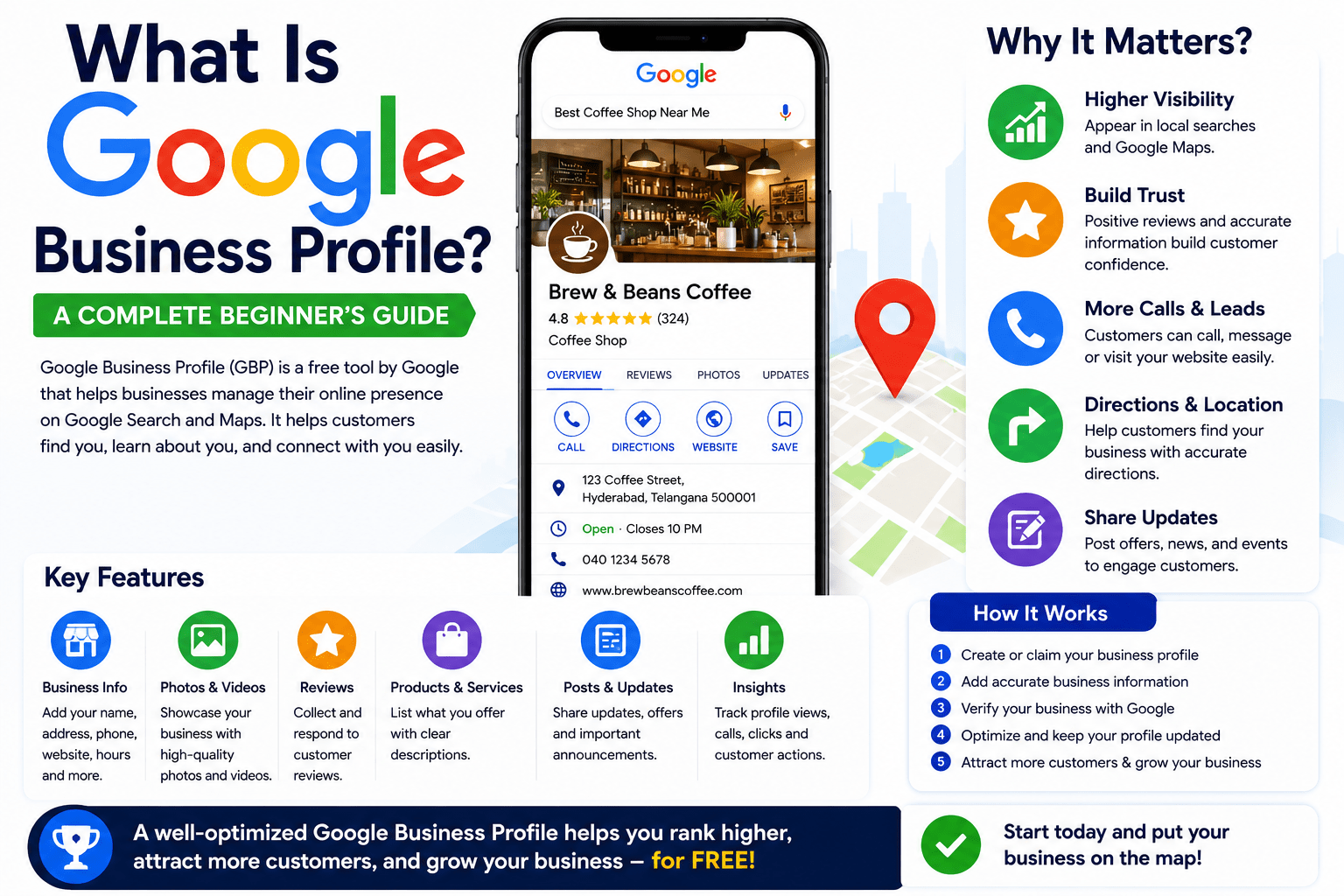
What is Google Business Profile? A Complete Beginner’s Guide (2026)
Introduction
Imagine a customer searching on Google for “coffee shop near me,” “best dentist in Hyderabad,” or “digital marketing agency nearby.” Within seconds, Google displays a list of local businesses complete with ratings, photos, directions, phone numbers, business hours, and customer reviews. This information comes from Google Business Profile (GBP).
For local businesses, Google Business Profile is one of the most powerful free marketing tools available. It helps potential customers discover your business, learn about your services, and contact you directly—all without visiting your website.
Whether you own a restaurant, salon, retail store, clinic, gym, law firm, hotel, or service-based business, having a well-optimized Google Business Profile can significantly improve your online visibility and attract more customers.
In this beginner’s guide, you’ll learn what Google Business Profile is, why it’s important, how it works, how to create one, and the best practices for optimizing your profile in 2026.
What is Google Business Profile?
Google Business Profile (formerly known as Google My Business) is a free tool provided by Google that allows businesses to manage how they appear on Google Search and Google Maps.
A Google Business Profile displays key business information, including:
- Business name
- Address
- Phone number
- Website
- Business hours
- Customer reviews
- Photos and videos
- Products and services
- Directions
- Questions and answers
- Business updates
- Booking or appointment links
When someone searches for your business or a service you offer, your Google Business Profile may appear in search results, making it easier for customers to find and contact you.
Why is Google Business Profile Important?
Most customers search online before visiting a local business. A complete Google Business Profile increases your chances of appearing in local search results and Google Maps.
Here are some of the key benefits:
1. Improves Local Visibility
Google Business Profile helps your business appear in searches such as:
- Restaurants near me
- Best dentist in Hyderabad
- Hair salon nearby
- Grocery store open now
- Digital marketing agency near me
The more complete and optimized your profile is, the better your chances of appearing in these results.
2. Builds Customer Trust
A professional business profile with:
- Verified information
- Positive reviews
- High-quality photos
- Updated business hours
helps customers trust your business before they even contact you.
3. Increases Website Traffic
Customers can easily click your website link directly from your profile.
This often results in:
- More visitors
- More inquiries
- More bookings
- More sales
4. Generates More Phone Calls
Google displays a prominent “Call” button on mobile devices, allowing customers to contact your business instantly.
5. Helps Customers Find Your Location
Your profile integrates with Google Maps, enabling users to get driving directions with a single tap.
This is especially valuable for businesses with physical locations.
Where Does Google Business Profile Appear?
Your profile can appear across several Google platforms:
Google Search
When someone searches for your business or related services, your profile may appear alongside the search results.
Google Maps
Google Maps displays businesses based on:
- Distance
- Relevance
- Customer reviews
- Business information
Local Pack (Map Pack)
The Local Pack is the section showing the top local businesses beneath the map.
Appearing here can generate a significant amount of traffic and leads.
Voice Search
When users ask voice assistants questions like:
- “Where’s the nearest pharmacy?”
- “Find a pizza restaurant near me.”
Google often uses Business Profile information to provide answers.
Who Should Use Google Business Profile?
Almost every business serving customers locally can benefit from a Google Business Profile.
Examples include:
- Restaurants
- Cafes
- Hotels
- Hospitals
- Clinics
- Dentists
- Schools
- Colleges
- Gyms
- Beauty salons
- Retail stores
- Grocery shops
- Lawyers
- Accountants
- Real estate agencies
- Auto repair shops
- Electricians
- Plumbers
- Digital marketing agencies
- Freelancers with physical offices
If customers can visit your business or you provide services in a specific area, you should have a Google Business Profile.
What Information Can You Add?
A complete profile helps Google understand your business and provides customers with the information they need.
Important details include:
Business Name
Use your official business name.
Avoid adding unnecessary keywords.
Business Category
Choose the category that best describes your business.
Examples:
- Restaurant
- Hospital
- Hair Salon
- Marketing Agency
- Grocery Store
You can also add secondary categories.
Address
Provide your complete business address so customers can locate you easily.
Service Areas
If you visit customers instead of operating from a storefront, specify the locations you serve.
Phone Number
Use your primary business contact number.
Website
Add your official website.
Customers often visit your website to learn more before making a decision.
Business Hours
Always keep your hours up to date, especially during holidays.
Incorrect hours can frustrate customers and lead to lost business.
Products and Services
List all the products and services you offer with clear descriptions.
This helps Google understand your business better.
Photos
Upload high-quality images of:
- Storefront
- Interior
- Staff
- Products
- Services
- Office
- Team
- Equipment
Businesses with quality photos typically receive more customer engagement.
Videos
Short videos showcasing your business help customers connect with your brand.
Customer Reviews
Customer reviews are one of the most important parts of a Google Business Profile.
Positive reviews help:
- Build trust
- Improve rankings
- Increase conversions
- Attract new customers
Encourage satisfied customers to leave honest reviews after a purchase or service.
Always respond politely to every review, whether positive or negative.
How Google Business Profile Helps Local SEO
Local SEO focuses on improving visibility for location-based searches.
Google Business Profile is one of the strongest local ranking factors.
Google considers:
- Relevance
- Distance
- Prominence
Your profile plays a major role in all three.
A well-optimized profile increases your chances of appearing in Google’s Local Pack.
How to Create a Google Business Profile
Creating a profile is simple.
Step 1: Sign in with a Google Account
Use a Google account dedicated to your business.
Step 2: Visit Google Business Profile
Search for “Google Business Profile” and begin the setup process.
Step 3: Enter Your Business Name
If your business already exists, claim it.
Otherwise, create a new listing.
Step 4: Choose a Business Category
Select the category that best matches your business.
Step 5: Add Your Location
Enter your physical address if customers visit your location.
Step 6: Add Contact Details
Include:
- Phone number
- Website
- Service areas
Step 7: Verify Your Business
Google may verify your business through:
- Video verification
- Phone
- Postcard
- Live video verification
Verification confirms that you own or manage the business.
Optimizing Your Google Business Profile
Creating a profile is only the first step.
Optimization is what helps you rank higher.
Complete Every Section
Don’t leave any fields blank.
Google prefers complete profiles.
Upload New Photos Regularly
Fresh photos signal that your business is active.
Try adding new images every month.
Write a Detailed Business Description
Explain:
- Who you are
- What you offer
- Why customers should choose you
Keep it informative and customer-focused.
Add Products and Services
Each service should include:
- Name
- Description
- Price (optional)
This improves search relevance.
Publish Google Posts
Share:
- Promotions
- New products
- Events
- Tips
- Company news
Regular posts keep your profile active.
Answer Customer Questions
Monitor the Questions & Answers section and provide accurate responses.
Enable Messaging
Allow customers to contact your business directly through your profile.
Respond quickly to inquiries.
Common Mistakes to Avoid
Many businesses unknowingly reduce their visibility by making avoidable mistakes.
Avoid:
- Incomplete profiles
- Incorrect business categories
- Outdated business hours
- Low-quality images
- Ignoring reviews
- Keyword stuffing in the business name
- Duplicate listings
- Inconsistent contact information
- Never updating the profile
Keeping your profile accurate and active improves both customer experience and search performance.
Measuring Your Success
Google Business Profile provides valuable insights, including:
- Number of profile views
- Search queries customers used
- Website clicks
- Phone calls
- Direction requests
- Photo views
- Customer actions
Use these insights to understand customer behavior and improve your local marketing strategy.
Tips for Long-Term Success
To get the most from your Google Business Profile:
- Keep your information accurate.
- Encourage genuine customer reviews.
- Respond to all reviews promptly.
- Upload high-quality photos regularly.
- Post updates consistently.
- Add all products and services.
- Monitor your profile insights.
- Update holiday hours and special events.
- Ensure your website is mobile-friendly.
- Combine your profile with a strong Local SEO strategy.
Consistency is key. Businesses that actively manage their profiles tend to perform better in local search results.
Frequently Asked Questions
Is Google Business Profile Free?
Yes. Google Business Profile is completely free to create and manage.
Can I Use It Without a Website?
Yes. While having a website is recommended, you can still create a profile without one.
How Long Does Verification Take?
Verification times vary depending on the method used. Some businesses are verified within minutes, while others may take several days.
Can Home-Based Businesses Use Google Business Profile?
Yes. Service-area businesses can hide their address and specify the locations they serve.
How Often Should I Update My Profile?
Review your profile regularly and update it whenever your business information changes. Posting new content every week and adding fresh photos monthly can help keep your profile active.
Conclusion
Google Business Profile is much more than an online business listing—it’s a powerful tool for connecting with local customers, improving your visibility in Google Search and Google Maps, and building trust through reviews, photos, and accurate information.
For beginners, setting up a Google Business Profile is one of the easiest and most cost-effective ways to grow a local business online. By completing every section, keeping your information current, encouraging customer reviews, and posting regular updates, you can increase your chances of appearing in local search results and attracting more qualified leads.
As Google continues to enhance its search experience with AI, maintaining a complete and active Google Business Profile will become even more important. Start optimizing your profile today, and you’ll be well-positioned to reach more customers and grow your business in 2026 and beyond.