
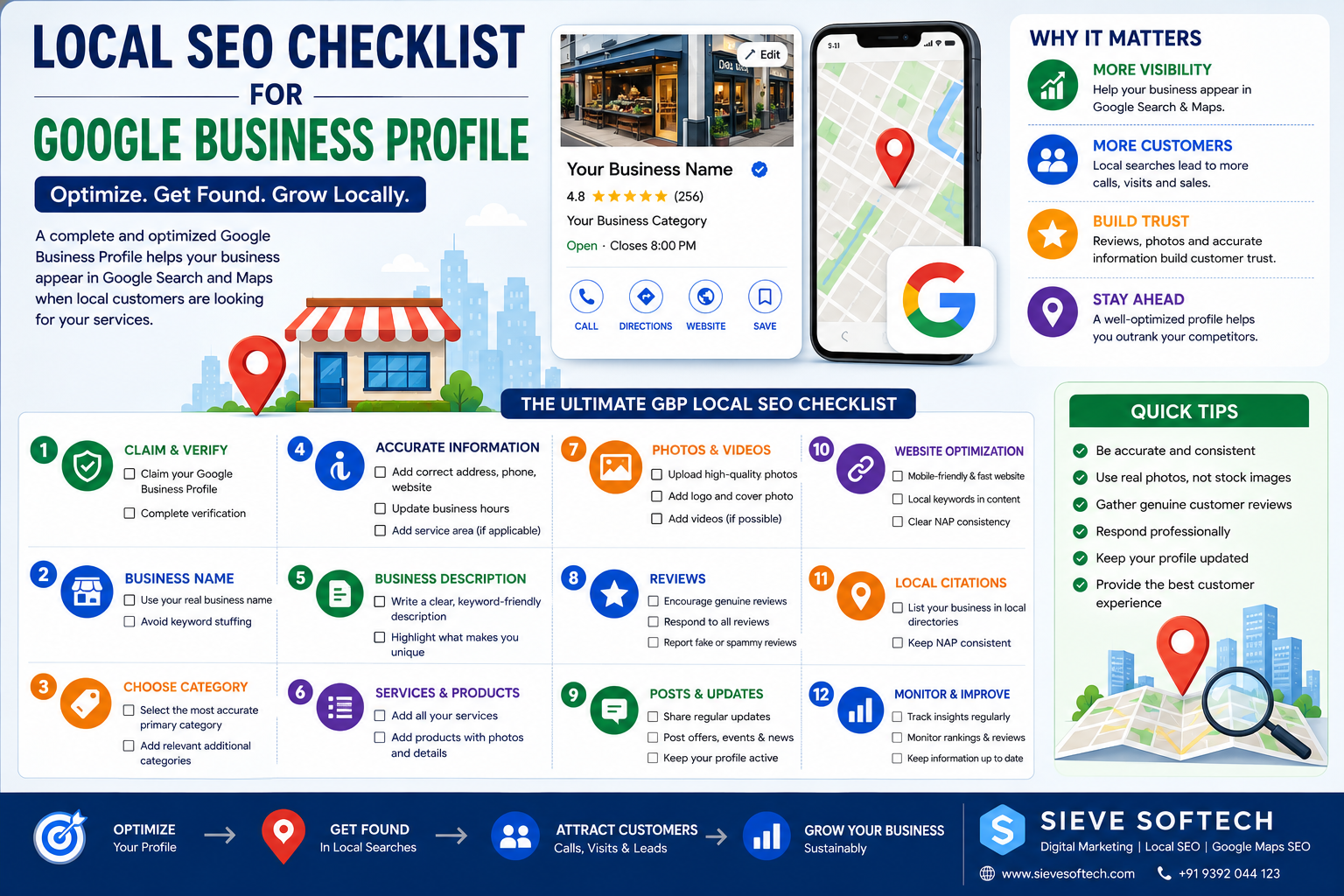
Local SEO Checklist for Google Business Profile: Complete 2026 Guide
Introduction
A well-optimized Google Business Profile (GBP) can help local customers discover your business when they search on Google Search and Google Maps. But simply creating a profile isn’t enough. Local SEO requires accurate business information, the right category, genuine reviews, useful content, strong website signals, and regular monitoring.
For example, when someone searches for “digital marketing agency near me,” “dentist in Hyderabad,” “best restaurant near me,” or “courier service in Hyderabad,” Google evaluates different signals to determine which local businesses are most relevant.
Google says local results are mainly based on relevance, distance, and prominence. Complete and accurate Business Profile information can help Google better understand a business and match it with relevant searches.
This Local SEO checklist for Google Business Profile will help you review your profile step by step and identify areas that may need improvement.
What Is Google Business Profile Local SEO?
Google Business Profile Local SEO is the process of optimizing your business information and online presence so that your business has a better opportunity to appear for relevant local searches.
It includes activities such as:
- Optimizing your business category
- Keeping business information accurate
- Adding services and products
- Collecting genuine customer reviews
- Uploading original photos
- Improving your website
- Building relevant local citations
- Earning quality local backlinks
- Monitoring your Google Maps presence
The goal isn’t simply to rank for one keyword.
The goal is to make your business relevant, trustworthy, and easy to discover when potential customers search locally.
Why a Google Business Profile Matters for Local SEO
Google Business Profile acts as an important connection between your business and local customers.
A customer can use your profile to:
- Find your location
- Call your business
- Visit your website
- Get directions
- Read reviews
- View photos
- Check opening hours
- Learn about your services
- Take other available actions
A complete profile also gives Google more information about your business.
Google recommends keeping your Business Profile information complete and accurate so customers can understand what your business does, where it is located, and when it is available.
Local SEO Checklist for Google Business Profile
Use the following checklist to audit your profile.
1. Claim and Verify Your Google Business Profile
The first step is making sure your business owns and manages its profile.
Checklist:
- Business Profile has been claimed
- Business has completed Google’s verification process
- Correct owner or authorized manager has access
- Former employees or agencies don’t have unnecessary access
- Business information is controlled by the business
Verification helps establish that the business is eligible to manage its profile.
If someone else created your listing, make sure ownership and access are properly managed.
2. Use the Correct Business Name
Your business name should represent the real-world name of your business.
Avoid adding unnecessary keywords or locations to your business name simply to manipulate rankings.
For example, don’t change:
Sieve Softech
into:
Sieve Softech – Best SEO Company in Hyderabad
unless that is genuinely the business’s real-world name.
Google’s guidelines require businesses to represent their name accurately.
Checklist:
- Real business name used
- No keyword stuffing
- No unnecessary location keywords
- Name matches your real-world branding
3. Choose the Right Primary Category
Your primary category is one of the most important parts of your Business Profile.
It should describe what your business is, rather than every service you provide.
For example:
- Dentist
- Restaurant
- Hotel
- Clothing store
- Digital marketing agency
- Auto repair shop
Choose the most specific category that accurately represents your main business.
Google recommends selecting the most specific category available that accurately describes the business.
Checklist:
- Primary category accurately describes the business
- Category is relevant to your main service
- No unrelated categories
- Category is reviewed when the business changes
4. Add Relevant Additional Categories
Google allows businesses to add additional categories where appropriate.
However, more categories don’t automatically mean better rankings.
Only add categories that genuinely represent significant aspects of your business.
Checklist:
- Additional categories are relevant
- No keyword-based category stuffing
- Categories accurately represent the business
- Unnecessary categories have been removed
5. Add Accurate Business Information
Make sure every important detail is correct.
Check:
- Business address
- Phone number
- Website
- Business hours
- Holiday hours
- Service area
- Appointment information
- Business description
Incorrect information can create a poor customer experience.
For example, if your profile says you’re open until 9 PM but you actually close at 7 PM, customers may arrive after closing.
Checklist:
- Address is correct
- Phone number is correct
- Website URL works
- Opening hours are accurate
- Special hours are updated
- Service area is accurate
6. Write a Useful Business Description
Your Business Profile description should clearly explain:
- What your business does
- What services you provide
- Who you serve
- What makes your business different
- Where you operate, when relevant
Don’t write a description that looks like a list of keywords.
Example
Instead of:
“Best SEO SEO SEO company Hyderabad SEO agency best SEO services…”
Write naturally:
“Sieve Softech provides SEO, Google Ads, social media marketing, website development, and digital marketing services for businesses looking to strengthen their online presence.”
The second version is easier for customers to understand and creates a more professional impression.
7. Add Your Services
Use the services section to clearly explain what you offer.
For example, a digital marketing agency could include:
- SEO
- Local SEO
- Google Business Profile Optimization
- Google Ads
- Social Media Marketing
- Content Marketing
- Website Development
A healthcare business could list relevant medical services, while a salon could list hair, beauty, and styling services.
Checklist:
- Main services added
- Services accurately described
- Service names are clear
- Outdated services removed
- No misleading services
8. Add Products Where Relevant
Businesses that sell products can use the appropriate product features available to their profile.
Add:
- Product name
- Description
- Image
- Relevant information
Keep the information accurate and updated.
This can help customers understand what your business offers before visiting.
9. Upload High-Quality Photos
Photos are an important part of a local business profile.
Customers often want to see what a business looks like before visiting.
Consider adding:
- Exterior photos
- Interior photos
- Team photos
- Product photos
- Service photos
- Equipment
- Completed projects
- Workspace
- Branding
Photo checklist:
- Logo uploaded
- Cover photo added
- Exterior photo added
- Interior photo added
- Product/service photos added
- Photos are clear
- Photos represent the real business
Avoid using misleading or unrelated images.
10. Encourage Genuine Customer Reviews
Reviews can have a major impact on customer trust.
Google says review quantity and positive ratings can contribute to local ranking, although they are only part of the overall local ranking system.
Ask genuine customers to share honest feedback after completing a purchase or service.
Don’t:
- Buy reviews
- Create fake reviews
- Ask employees to review the business
- Offer rewards for positive reviews
- Manipulate customer feedback
Review checklist:
- Genuine reviews requested
- Review link shared with customers
- Reviews monitored regularly
- Negative reviews answered professionally
- Suspicious policy-violating reviews reported
11. Respond to Customer Reviews
Don’t treat reviews as one-way communication.
Respond to customers professionally.
For positive reviews:
“Thank you for sharing your experience. We appreciate your support and look forward to serving you again.”
For negative reviews:
“Thank you for your feedback. We’re sorry your experience did not meet expectations. Please contact our team so we can understand the issue and work toward a resolution.”
Avoid arguments, insults, or personal information.
12. Optimize Your Website for Local SEO
Your Google Business Profile shouldn’t exist separately from your website.
Your website should clearly communicate:
- Business name
- Location
- Contact information
- Services
- Areas served
- About the business
- Customer information
- Relevant local content
Create dedicated service pages where appropriate.
For example:
SEO Services in Hyderabad
can explain your services, process, industries served, and local expertise.
Don’t create hundreds of nearly identical location pages just to target different cities.
13. Maintain NAP Consistency
NAP stands for:
Name – Address – Phone Number
Try to maintain consistent business information across important online platforms.
Check:
- Google Business Profile
- Website
- Social media
- Business directories
- Industry websites
- Local directories
Inconsistent information can confuse customers and make your online presence less reliable.
14. Build Relevant Local Citations
A citation is an online mention of your business information.
Examples include:
- Local directories
- Industry directories
- Business associations
- Local websites
- Professional organizations
Focus on quality and relevance, rather than creating hundreds of low-quality listings.
Checklist:
- Important directories updated
- Business information consistent
- Duplicate listings identified
- Incorrect listings corrected
- Relevant industry directories considered
15. Earn Local Backlinks
Backlinks from relevant websites can help build authority.
Potential opportunities include:
- Local news websites
- Business associations
- Industry publications
- Local organizations
- Community websites
- Business partners
For example, if your company sponsors a local event and the event organizer legitimately mentions your business, that can create a useful local connection.
Avoid buying large quantities of low-quality links.
16. Create Local Content
Your website should answer questions that local customers actually have.
Examples:
- How Much Does SEO Cost in Hyderabad?
- How to Choose a Digital Marketing Agency in Hyderabad
- Best Google Maps SEO Strategies for Local Businesses
- How to Optimize a Google Business Profile
- International Courier Services from Hyderabad
Useful local content can demonstrate experience and expertise while helping potential customers.
17. Use Local Keywords Naturally
Local keywords can help search engines understand geographic relevance.
Examples:
- Digital marketing agency in Hyderabad
- SEO company in Hyderabad
- Google Maps SEO Hyderabad
- Courier service in Hyderabad
Use keywords naturally in:
- Page titles
- Headings
- Service pages
- Content
- Image alt text where appropriate
- Internal links
Avoid keyword stuffing.
18. Add Local Business Structured Data
Businesses can use appropriate structured data on their websites to help search engines understand information about the organization and local business.
Depending on your business, relevant structured data may include:
- Business name
- Address
- Phone number
- Opening hours
- Website
- Business type
Make sure structured data accurately represents information visible on the page.
19. Keep Business Hours Updated
Incorrect hours are one of the easiest ways to lose customer trust.
Update your profile when:
- Holidays occur
- Business hours change
- You temporarily close
- You open a new location
- You change service availability
Checklist:
- Regular hours accurate
- Holiday hours updated
- Temporary closures updated
- Website hours match profile
20. Monitor Google Maps Performance
Local SEO should be measured.
Monitor available Business Profile insights and other relevant metrics.
Look at:
- Searches
- Calls
- Website visits
- Direction requests
- Customer actions
- Review growth
- Local visibility
You can also monitor your website through tools such as Google Search Console and Google Analytics.
The objective isn’t just higher rankings.
It’s attracting relevant customers and generating business results.
21. Check for Fake or Suspicious Reviews
Fake reviews can damage your online reputation.
Watch for:
- Reviews from people who never interacted with your business
- Multiple suspicious accounts
- Repeated or copied content
- Reviews containing promotional spam
- Conflicts of interest
Don’t report a review simply because it is negative.
Report content that actually violates Google’s policies.
22. Keep Your Profile Active and Accurate
Don’t create a profile and forget about it.
Regularly review:
- Categories
- Services
- Photos
- Hours
- Reviews
- Business information
- Products
- Website links
A quarterly Local SEO audit can help identify outdated information.
Complete Google Business Profile Local SEO Checklist
Here’s a simple checklist you can save:
Business Profile
- Profile claimed
- Profile verified
- Correct business name
- Correct primary category
- Relevant additional categories
- Accurate address
- Correct phone number
- Website connected
- Business hours updated
- Special hours updated
- Business description optimized
- Services added
- Products added where relevant
Content
- Logo added
- Cover image added
- Original photos uploaded
- Videos added where appropriate
- Website has local content
- Service pages optimized
- Local keywords used naturally
Reputation
- Genuine reviews requested
- Reviews answered
- Negative feedback handled professionally
- Fake reviews reported when appropriate
Local Authority
- NAP information consistent
- Local citations built
- Relevant backlinks earned
- Industry listings updated
- Local partnerships developed
Monitoring
- Google Business Profile performance reviewed
- Search visibility monitored
- Calls monitored
- Website traffic monitored
- Reviews monitored
- Profile information audited regularly
Common Local SEO Mistakes to Avoid
Keyword Stuffing
Don’t add keywords everywhere.
Write for people first.
Fake Reviews
Never purchase or manufacture reviews.
Duplicate Profiles
Avoid creating multiple profiles for the same business location unless Google’s guidelines allow it.
Wrong Categories
Don’t choose categories simply because competitors use them.
Outdated Information
Old hours, phone numbers, or services can create customer frustration.
Low-Quality Backlinks
Don’t build links from unrelated or spammy websites.
Duplicate Local Pages
Don’t publish hundreds of pages with the same content and only change the city name.
How Sieve Softech Can Help With Local SEO
Optimizing a Google Business Profile is only one part of a successful local marketing strategy.
Sieve Softech can help businesses improve their local online presence through:
- Google Business Profile Optimization
- Google Maps SEO
- Local SEO
- Google Business Profile Audits
- Local Keyword Research
- Review & Reputation Management
- Local Citation Management
- Technical SEO
- On-Page SEO
- Content Marketing
- Website Development
- Google Ads
- Social Media Marketing
A strong strategy combines your Business Profile, website, reviews, content, citations, backlinks, and customer experience.
The objective is to make your business easier for both Google and potential customers to understand and trust.
Frequently Asked Questions
Is Google Business Profile important for Local SEO?
Yes. A Business Profile helps eligible local businesses appear in Google Search and Maps and gives customers important information about the business.
How often should I update my Google Business Profile?
Review it regularly and update information whenever your business changes. A quarterly audit is a useful starting point.
Do reviews improve Google Maps rankings?
Reviews are one factor in Google’s local search system. Google states that review quantity and positive ratings can contribute to local ranking, alongside factors such as relevance, distance, and prominence.
Can I guarantee a #1 Google Maps ranking?
No. Google states that there is no way to request or pay for a better local ranking. Businesses should focus on improving relevance, prominence, and the overall customer experience.
Should I add as many Google Business Profile categories as possible?
No. Choose categories that accurately describe your business. Adding unrelated categories simply to target more searches can create an inaccurate profile.
Conclusion
A successful Google Business Profile strategy isn’t about finding one secret ranking trick. It is about consistently providing Google and customers with accurate, relevant, useful, and trustworthy information.
Start with the basics: claim and verify your profile, choose the right category, maintain accurate business information, add services, upload original photos, collect genuine reviews, and keep your business hours updated.
Then build beyond your profile.
Optimize your website for Local SEO, create helpful local content, maintain consistent business information across important directories, earn relevant local links, and monitor your performance.
Google’s local search system considers multiple factors, including relevance, distance, and prominence. A complete Business Profile is therefore just one part of a larger strategy.
If you’re working on Local SEO in 2026, use this checklist as a regular audit. Fix the basics first, build genuine authority over time, and focus on creating a better experience for the customers who are actually searching for your business.
Need help with Google Business Profile optimization or Local SEO? Sieve Softech can help you build and manage a complete local search strategy tailored to your business and target location.