
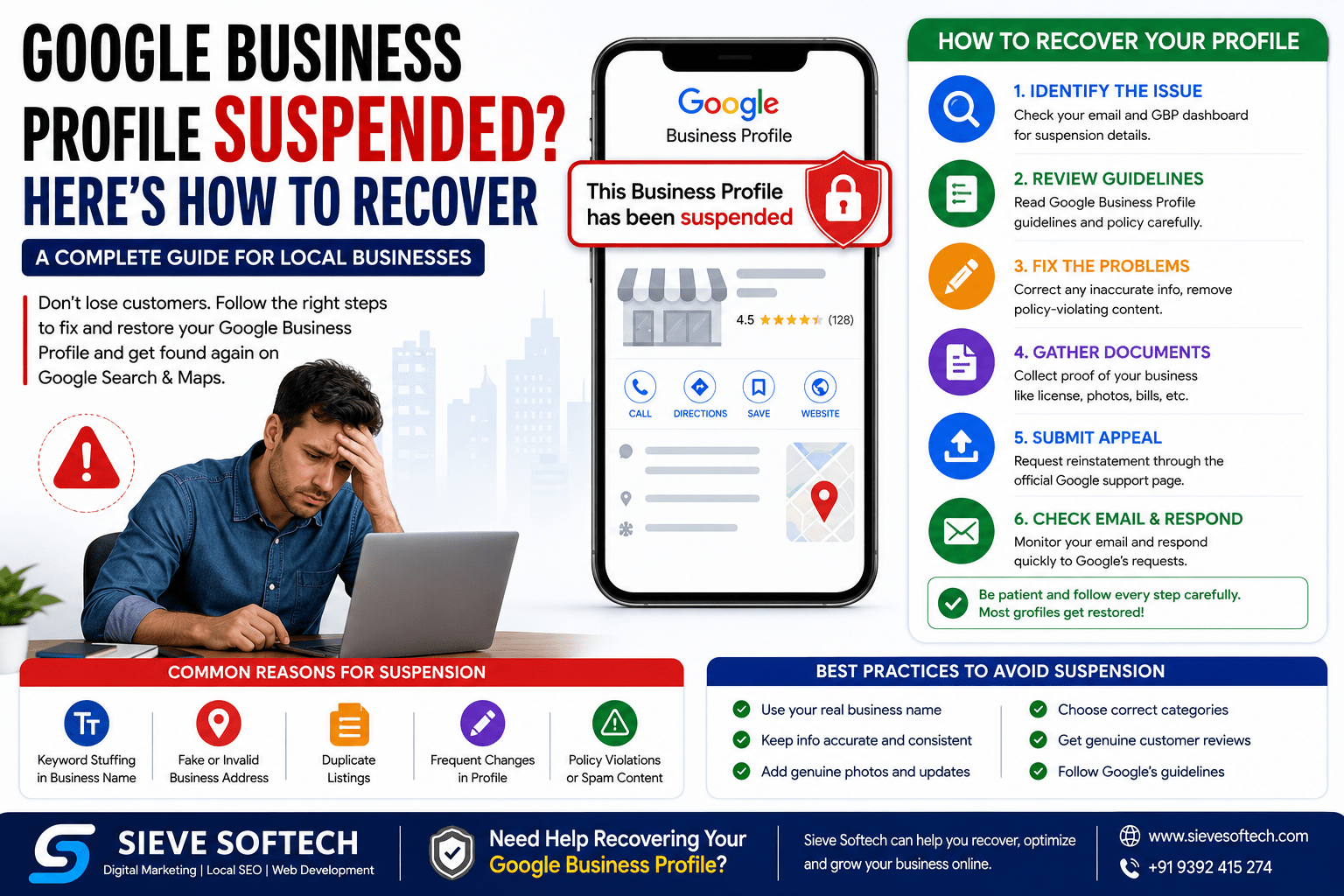
Google Business Profile Suspended? Here’s How to Recover
A Google Business Profile (GBP) is one of the most valuable digital assets for any local business. Whether you own a restaurant, clinic, salon, retail store, law firm, or digital marketing agency, your Google Business Profile helps customers discover your business through Google Search and Google Maps.
When your Google Business Profile gets suspended, it can feel like your business has disappeared overnight. Your listing may stop appearing in search results, customer reviews become inaccessible, and potential customers struggle to find your contact details, directions, or business hours.
The good news is that most Google Business Profile suspensions can be resolved if you identify the reason, correct the issue, and submit a proper reinstatement request.
This guide explains everything you need to know about recovering a suspended Google Business Profile in 2026.
What Is a Google Business Profile Suspension?
A Google Business Profile suspension occurs when Google determines that your listing violates one or more of its quality guidelines or policies.
When suspended, your business listing may disappear from Google Search and Maps, significantly reducing local visibility and customer inquiries.
Google suspends listings to maintain accurate, trustworthy information for users and prevent spam or misleading business practices.
Types of Google Business Profile Suspensions
Understanding the type of suspension helps determine the recovery process.
1. Soft Suspension
In a soft suspension:
- Your business may still appear on Google Maps.
- You lose management access.
- You cannot edit your profile.
- Updates become unavailable.
This usually occurs due to verification or ownership-related issues.
2. Hard Suspension
A hard suspension is more serious.
Your business:
- Completely disappears from Google Search
- Disappears from Google Maps
- Cannot receive new reviews
- Loses local visibility
- Cannot attract new customers through GBP
Hard suspensions usually require submitting a reinstatement request.
Why Does Google Suspend Business Profiles?
Google rarely suspends listings without a reason. Most suspensions result from violations of Google’s Business Profile Guidelines.
Common reasons include:
1. Keyword Stuffing
Adding unnecessary keywords to your business name is one of the biggest reasons for suspension.
Incorrect:
ABC Dental Clinic | Best Dentist Hyderabad | Teeth Whitening | Dental Implant
Correct:
ABC Dental Clinic
Use only your real-world business name.
2. Virtual Office Addresses
Google requires businesses to have a legitimate physical location if they display an address.
Using:
- Virtual offices
- Coworking spaces without permanent staff
- Fake locations
- PO Boxes
may trigger suspension.
3. Inconsistent Business Information
Different information across websites can confuse Google’s systems.
Ensure consistency for:
- Business name
- Address
- Phone number
- Website
- Business hours
4. Multiple Listings
Creating multiple listings for the same business location violates Google’s policies.
Duplicate listings often result in suspension.
5. Service Area Violations
If you’re a service-area business:
- Hide your address if customers don’t visit your location.
- Define only actual service areas.
Displaying an address without serving customers there may violate guidelines.
6. Frequent Profile Changes
Repeatedly editing:
- Business name
- Categories
- Address
- Phone number
within a short period can trigger Google’s spam detection.
7. Fake Reviews
Buying reviews or posting fake customer feedback is a major violation.
Google actively removes fraudulent reviews and may suspend your listing.
8. Prohibited Content
Businesses involved in misleading content, scams, restricted products, or policy violations risk suspension.
Signs Your Google Business Profile Is Suspended
You may notice:
- Listing missing from Google Maps
- Business not appearing in Search
- Suspension notification in your dashboard
- Loss of customer calls
- Drop in direction requests
- Sudden decrease in website traffic
- Missing reviews
- Verification issues
Step-by-Step Guide to Recover a Suspended Google Business Profile
Step 1: Read Google’s Suspension Email Carefully
Google usually sends an email explaining that your profile has been suspended.
Although it may not specify the exact violation, it indicates that your listing breached Business Profile guidelines.
Read it carefully before making changes.
Step 2: Review Google’s Guidelines
Before requesting reinstatement, compare your profile against Google’s policies.
Check:
- Business name
- Address
- Phone number
- Website
- Categories
- Business description
- Photos
- Service areas
Correct every issue before appealing.
Step 3: Update Incorrect Information
Remove anything that violates Google’s policies.
Examples include:
- Promotional keywords
- Fake addresses
- Duplicate phone numbers
- Incorrect categories
- Misleading descriptions
Keep your information accurate and consistent.
Step 4: Gather Supporting Documents
Google may ask for proof that your business is legitimate.
Useful documents include:
- Business registration certificate
- GST registration
- Utility bills
- Tax documents
- Business license
- Lease agreement
- Storefront photos
- Office interior photos
- Business signage
- Website showing your business details
The more legitimate documentation you provide, the stronger your reinstatement request.
Step 5: Submit a Reinstatement Request
Once you’ve corrected your profile, submit the reinstatement form.
Include:
- Honest explanation
- Business information
- Supporting documents
- Evidence of corrections
Avoid emotional or aggressive language.
Professional requests receive better consideration.
Step 6: Wait Patiently
Google generally reviews reinstatement requests within:
- 3–7 business days
- Sometimes up to two weeks
- Longer during high-volume periods
Avoid submitting multiple appeals, as this may delay the review.
How to Write an Effective Reinstatement Appeal
A good appeal should include:
- Business name
- Profile ID (if available)
- Explanation of the issue
- Confirmation that violations have been corrected
- Supporting evidence
- Commitment to follow Google’s guidelines
Example:
“Our business recently discovered that our profile contained information inconsistent with Google’s guidelines. We have corrected all inaccuracies, updated our business details, and attached supporting documents verifying our legitimate operation. We respectfully request a review and reinstatement of our Google Business Profile.”
Keep your message factual and concise.
Documents That Improve Approval Chances
Google prefers strong verification evidence.
Helpful documents include:
- Certificate of incorporation
- Business registration
- GST certificate
- Utility bill
- Rental agreement
- Commercial lease
- Storefront photographs
- Interior office photos
- Employee workspace images
- Business invoices
- Official website
- Tax records
Common Mistakes During Recovery
Many businesses unintentionally make recovery harder.
Avoid:
- Creating a new Business Profile
- Submitting multiple appeals
- Using fake documentation
- Editing the profile repeatedly after submission
- Ignoring Google’s guidelines
- Uploading low-quality or unrelated documents
How to Prevent Future Suspensions
Prevention is always easier than recovery.
Follow these best practices:
Use Your Real Business Name
Never add:
- SEO keywords
- City names
- Promotional phrases
- Marketing slogans
Use the exact name displayed on your storefront and legal documents.
Maintain Accurate Business Information
Ensure consistency across:
- Website
- Social media
- Directories
- Google Business Profile
Avoid Duplicate Listings
Maintain only one verified profile for each eligible business location.
Keep Business Hours Updated
Update:
- Holiday hours
- Seasonal schedules
- Temporary closures
Regular maintenance helps build trust.
Upload Real Photos
Use genuine images of:
- Storefront
- Office
- Team
- Products
- Services
- Interior
Authentic photos improve credibility.
Follow Google’s Guidelines
Review Google’s policies periodically, as they may change over time.
Staying compliant reduces the risk of future suspensions.
Why Your Google Business Profile Matters
A healthy Google Business Profile helps you:
- Rank higher in local search results
- Receive more phone calls
- Increase website traffic
- Gain customer trust
- Collect positive reviews
- Improve local SEO
- Drive more foot traffic
- Generate qualified leads
- Increase conversions
For many local businesses, it is one of the highest-performing free marketing channels available.
Frequently Asked Questions
Can I create a new Google Business Profile after suspension?
No. Creating a new profile for the same business may violate Google’s policies and can make recovery more difficult. Resolve the suspension on the existing profile whenever possible.
How long does reinstatement take?
Most requests are reviewed within a few business days, but complex cases or high review volumes can extend the process.
Will my reviews return after reinstatement?
In many cases, existing reviews are restored once the profile is reinstated. However, review restoration depends on the specific circumstances of the suspension.
Can I edit my profile while it’s suspended?
If you still have access, you can correct inaccurate information before submitting a reinstatement request. Avoid making unnecessary or repeated changes afterward.
Should I hire an SEO expert?
If you’re unsure why your profile was suspended or have already had an appeal rejected, working with an experienced local SEO professional can help identify policy issues and prepare a stronger reinstatement request.
Final Thoughts
A suspended Google Business Profile can significantly impact your visibility, customer inquiries, and revenue—but it doesn’t have to be permanent. The key is to identify the reason for the suspension, bring your profile into compliance with Google’s guidelines, collect credible supporting documents, and submit a clear, honest reinstatement request.
Going forward, keep your business information accurate, avoid policy violations, and review your profile regularly. A well-maintained Google Business Profile not only reduces the risk of suspension but also strengthens your local SEO, builds customer trust, and helps your business attract more leads from Google Search and Maps.
If your business relies on local customers, protecting your Google Business Profile should be a top priority. A compliant, optimized listing is one of the most effective long-term investments you can make in your online presence.
Conclusion
A Google Business Profile suspension can temporarily disrupt your business, but it doesn’t have to become a long-term problem. Most suspensions can be resolved by understanding Google’s Business Profile guidelines, correcting inaccurate information, providing valid supporting documentation, and following the official reinstatement process carefully.
Beyond recovering your listing, keeping your Google Business Profile accurate, complete, and regularly updated is one of the most effective ways to improve your local SEO, build customer trust, and attract more leads through Google Search and Google Maps. A well-managed profile increases your visibility in local search results, encourages positive customer engagement, and helps your business stand out from the competition.
If you need expert assistance with Google Business Profile recovery, profile optimization, Google Maps SEO, or Local SEO, Sieve Softech is here to help. Our experienced team specializes in restoring suspended profiles, optimizing business listings for maximum visibility, and implementing proven local SEO strategies that drive qualified traffic, generate more customer inquiries, and support long-term business growth in today’s competitive digital landscape.