
What Is GMB in Digital Marketing? A Complete Guide to Google Business Profile in 2026
Introduction
If you’ve worked in digital marketing, SEO, or Local SEO, you have probably heard the term GMB.
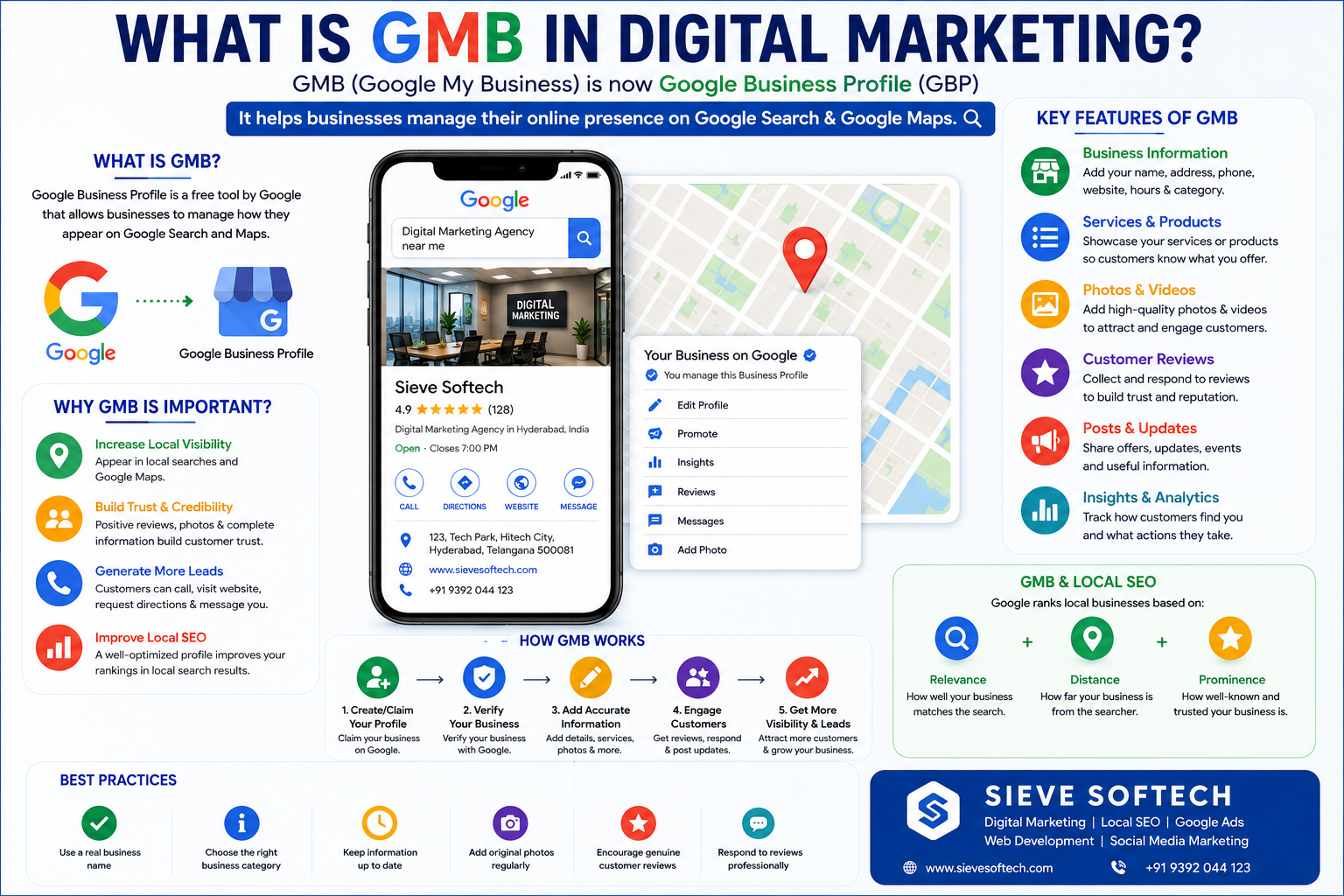
GMB stands for Google My Business, the former name of Google’s local business listing platform. Google now calls it Google Business Profile (GBP). The platform allows eligible businesses to manage how they appear on Google Search and Google Maps, including information such as business hours, phone number, website, location, photos, services, and customer reviews.
Even though many marketers and business owners still say “GMB,” the current official name is Google Business Profile.
For local businesses, GMB/GBP is an important part of digital marketing because customers often use Google to find businesses nearby. Someone searching for “SEO agency near me,” “best restaurant in Hyderabad,” “dentist near me,” or “courier service in Hyderabad” may see local business results before visiting a company’s website.
This makes Google Business Profile an important tool for Local SEO, Google Maps marketing, reputation management, customer engagement, and lead generation.
In this guide, we’ll explain what GMB means, how Google Business Profile works, why it matters in digital marketing, and how businesses can optimize their profiles.
What Does GMB Mean?
GMB means Google My Business.
Google My Business was the previous name of Google’s local business management platform. Google now uses the name Google Business Profile.
So, when someone says:
- GMB SEO
- GMB optimization
- GMB listing
- GMB ranking
- GMB marketing
- GMB profile
they are generally referring to Google Business Profile.
The purpose has remained focused on helping businesses manage their presence on Google Search and Maps.
Google describes Business Profile as a way to manage how a business appears on Google Maps and Search at no charge. Businesses can provide information such as their phone number, website, hours, and location, and can also interact with customers through photos, videos, and reviews.
What Is Google Business Profile?
Google Business Profile is a business listing that appears across Google Search and Google Maps for eligible businesses.
A typical profile may contain:
- Business name
- Primary category
- Address
- Phone number
- Website
- Business hours
- Service area
- Business description
- Services
- Products where available
- Photos
- Videos
- Customer reviews
- Questions and other available customer features
For example, if someone searches:
“Digital marketing agency in Hyderabad”
Google may display a group of local businesses that match the search.
A potential customer can then compare businesses, check reviews, view photos, visit websites, call companies, or request directions.
Google says Business Profiles act as a local storefront on Google Maps and Search for businesses that interact with customers in person.
Why Is GMB Important in Digital Marketing?
Digital marketing is not limited to websites and social media.
For businesses that serve a particular geographic area, Local SEO can be a major part of customer acquisition.
Google Business Profile helps connect local customers with businesses.
For example, a customer may search:
“SEO company near me”
Instead of clicking through several websites, they may first compare local listings.
They might look at:
- Ratings
- Reviews
- Location
- Opening hours
- Services
- Photos
- Website
- Phone number
This means your Business Profile can influence whether someone decides to contact your company.
A well-maintained profile can therefore support the wider digital marketing funnel:
Search → Discovery → Trust → Website/Call → Enquiry → Customer
GMB and Local SEO: What’s the Connection?
GMB is closely connected with Local SEO.
Local SEO is the process of improving a business’s online visibility for searches connected to a specific location.
Examples include:
- “Digital marketing agency Hyderabad”
- “Best salon in Kukatpally”
- “Dentist near me”
- “AC repair in Madhapur”
- “Courier service Hyderabad”
Google explains that local search results are mainly influenced by relevance, distance, and prominence.
Relevance
Relevance refers to how well a business matches what the customer is searching for.
For example, if someone searches for “SEO agency,” a digital marketing agency that clearly provides SEO services is more relevant than a business offering unrelated services.
Complete and detailed business information helps Google understand the business and match it with relevant searches.
Distance
Distance refers to how far the business is from the searcher or the location specified in the search.
For example:
“Restaurants near me”
will produce results influenced by the searcher’s location.
Prominence
Prominence refers to how well-known a business is.
Google says prominence can be influenced by information across the web, including links and reviews. Review quantity and positive ratings can also contribute to local ranking.
How Does GMB Work in Digital Marketing?
Google Business Profile works as a bridge between your business and customers searching on Google.
The process generally looks like this:
Step 1: Create or Claim Your Profile
The business creates or claims its listing.
Step 2: Verify the Business
Google requires verification before businesses can fully manage certain profile information and interact with customers.
Step 3: Add Accurate Information
The business provides:
- Name
- Address
- Phone
- Website
- Hours
- Category
- Services
Step 4: Optimize the Profile
The business adds relevant information, photos, services, and other available features.
Step 5: Build Customer Trust
Customers can leave genuine reviews, and the business can respond to them.
Step 6: Monitor Performance
Businesses can review available performance information and customer actions to understand how their profile is performing.
Key Features of Google Business Profile
1. Business Information
Businesses can provide important information such as:
- Address
- Phone number
- Website
- Opening hours
- Service area
Keeping this information accurate is essential.
Google states that complete and accurate business information makes businesses more likely to appear in relevant local search results.
2. Business Category
Your primary category helps Google understand the type of business you operate.
For example:
- Restaurant
- Hotel
- Dentist
- Clothing store
- Digital marketing agency
Choose a category that accurately describes your business.
Don’t select unrelated categories simply because you want to appear for more searches.
3. Services
Businesses can provide information about the services they offer.
A digital marketing agency might list:
- SEO
- Local SEO
- Google Ads
- Social Media Marketing
- Content Marketing
- Web Development
- Google Business Profile Optimization
This makes it easier for potential customers to understand what the agency offers.
4. Photos and Videos
Visual content can make a Business Profile more useful and trustworthy.
Businesses can add:
- Logo
- Cover images
- Office photos
- Product photos
- Team photos
- Service photos
- Videos
Google also notes that information on Business Profiles can come from multiple sources, including businesses, customers, websites, and other sources.
That makes it important to maintain accurate information and provide your own high-quality content.
5. Customer Reviews
Reviews are one of the most visible parts of many Business Profiles.
Customers may consider reviews before contacting a business.
A strong review strategy should focus on genuine customer feedback.
Businesses should never rely on:
- Fake reviews
- Purchased reviews
- Review manipulation
- Reviews from fake accounts
Instead, ask real customers to share honest experiences.
Google says review count and positive ratings can contribute to local ranking as part of prominence.
6. Responding to Reviews
Review management is part of reputation management.
If someone leaves a positive review, thank them.
If someone leaves a negative review, respond calmly and professionally.
For example:
“Thank you for sharing your feedback. We’re sorry that your experience did not meet expectations. Please contact our team so we can understand the issue and work toward a solution.”
Your response isn’t only for the original customer.
Future customers may read it too.
7. Website Integration
Your Google Business Profile and website should support each other.
Your website should provide detailed information about:
- Business
- Services
- Location
- Team
- Contact information
- Products
- Customer experience
For example, a digital marketing agency could have separate pages for:
- SEO Services
- Local SEO
- Google Ads
- Social Media Marketing
- Web Development
The Business Profile can then direct potential customers to the relevant website.
GMB and Google Maps Marketing
Google Maps is one of the most important areas where Business Profiles appear.
When customers search for local businesses, Google can display local results through Maps and Search.
For example:
“Digital marketing agency near me”
may show a map with multiple agencies.
A customer can compare the available options and decide which business to contact.
This makes Google Maps marketing particularly useful for businesses that depend on local customers.
However, businesses should understand that there is no guaranteed way to pay Google for a better organic local ranking. Google states that local rankings are determined by its systems and that businesses cannot request or pay for a better local ranking.
How to Optimize GMB for Digital Marketing
1. Complete Your Profile
Fill in as much relevant information as possible.
Check:
- Business name
- Category
- Address
- Phone
- Website
- Hours
- Services
- Photos
2. Keep Information Accurate
If your business moves, changes its phone number, or changes operating hours, update the profile.
Google uses information from different sources, so maintaining accurate information across your online presence is important.
3. Use Genuine Business Photos
Show customers what your business actually looks like.
For an agency:
- Office
- Team
- Meetings
- Events
- Workspace
- Projects
For a restaurant:
- Dining area
- Food
- Kitchen
- Exterior
- Staff
Authentic images can help potential customers understand the business.
4. Encourage Genuine Reviews
Ask satisfied customers for honest feedback.
Don’t tell customers what rating they must give.
The objective should be authentic customer experiences.
5. Respond to Reviews
Respond consistently and professionally.
This shows customers that your business is active and cares about feedback.
6. Create Helpful Local Content
Your website should contain useful content related to your services and location.
For example:
“How Hyderabad Businesses Can Improve Local SEO in 2026”
is more useful than repeatedly publishing pages that simply contain the same keywords.
7. Build Local Authority
Promote your business through legitimate channels such as:
- Local publications
- Industry websites
- Business directories
- Professional organizations
- Local partnerships
- Community events
Google says prominence can be influenced by information from across the web, including links and reviews.
GMB vs SEO: What’s the Difference?
GMB and traditional SEO are related but not identical.
Google Business Profile
Primarily supports local visibility on:
- Google Maps
- Google local results
- Business searches
Website SEO
Focuses on improving website visibility for relevant searches.
It includes:
- Keyword research
- Technical SEO
- On-page SEO
- Content
- Internal linking
- Backlinks
- User experience
Best Strategy
The strongest approach is usually to combine them.
Google Business Profile + Website SEO + Reviews + Local Content + Reputation + Local Authority
Together, these can create a stronger digital presence.
Benefits of GMB for Businesses
A properly managed Business Profile can help businesses:
Increase Local Visibility
Potential customers can discover the business through Search and Maps.
Build Trust
Reviews, photos, accurate information, and a professional profile can help customers evaluate the business.
Generate Calls
Customers can use available contact features to call the business.
Drive Website Traffic
The profile can direct customers to the business website.
Generate Directions
For eligible businesses with physical locations, customers can request directions.
Support Local SEO
A complete profile provides Google with useful information about the business.
Google specifically recommends keeping information complete and accurate to improve the chances of appearing in relevant local searches.
Common GMB Mistakes to Avoid
Keyword Stuffing
Don’t fill your business name or description with unnecessary keywords.
Fake Reviews
Don’t purchase or manufacture reviews.
Incorrect Categories
Don’t choose categories that don’t represent your actual business.
Outdated Information
Incorrect phone numbers and hours can lead to lost customers.
Duplicate Profiles
Don’t create unnecessary duplicate listings for the same business.
Low-Quality Photos
Avoid relying entirely on unrelated stock images.
Ignoring Reviews
Customers expect businesses to pay attention to feedback.
Expecting Instant Rankings
Local SEO takes time, and rankings can change depending on competition, location, search context, and Google’s systems.
Is GMB Free?
Yes. Google describes Business Profile as a way to manage a business’s presence on Google Maps and Search at no charge.
However, businesses may spend money on professional services such as:
- Local SEO
- Content marketing
- Website development
- Google Ads
- Reputation management
- Photography
- Social media marketing
These are separate marketing services and are not a fee paid to Google simply to create the Business Profile.
GMB for Digital Marketing Agencies
Digital marketing agencies can use Google Business Profile to demonstrate their own Local SEO expertise.
For example, an agency can optimize its profile around relevant services such as:
- SEO
- Local SEO
- Google Ads
- Social media marketing
- Website development
- Content marketing
The agency can also use:
- Case studies
- Client testimonials
- Team photos
- Original content
- Genuine reviews
- Local SEO articles
This helps potential customers understand the agency’s capabilities before contacting the business.
For an agency like Sieve Softech, Google Business Profile can work alongside the company’s website, SEO campaigns, Google Ads, social media marketing, and content strategy.
How to Measure GMB Success
Don’t measure success only by rankings.
Look at business outcomes such as:
- Calls
- Website visits
- Customer enquiries
- Direction requests
- Review growth
- Customer actions
- Leads
- New customers
A profile that generates qualified enquiries can be more valuable than one that simply appears for a large number of searches.
Track performance over time and compare changes after meaningful improvements.
GMB Checklist for 2026
Use this simple checklist:
- Business Profile claimed
- Business verified
- Correct business name
- Accurate primary category
- Complete business information
- Correct phone number
- Correct website
- Accurate business hours
- Services added
- High-quality photos uploaded
- Genuine reviews collected
- Reviews answered
- Website optimized for Local SEO
- Local content published
- Business information consistent across important websites
- Local authority developed
- Performance monitored regularly
Frequently Asked Questions
What is GMB in digital marketing?
GMB stands for Google My Business, the former name of Google’s local business listing platform. It is now called Google Business Profile and helps eligible businesses manage their presence on Google Search and Maps.
Is GMB the same as Google Business Profile?
Yes. Google Business Profile is the current name for the platform formerly known as Google My Business.
Is GMB important for SEO?
It is particularly important for Local SEO because it helps businesses manage information that can appear in Google Search and Maps.
Does GMB improve Google Maps rankings?
A complete and accurate profile can help Google understand your business and improve its eligibility for relevant local searches, but there is no guaranteed ranking position. Google says local ranking is primarily based on relevance, distance, and prominence.
Can I use GMB without a website?
Yes. Google Business Profile can provide customers with essential business information even if a business doesn’t have its own website.
How often should I update my Google Business Profile?
Update it whenever your business information changes. It’s also useful to review the profile regularly to make sure the information, photos, services, and customer interactions remain accurate.
Conclusion
So, what is GMB in digital marketing?
GMB means Google My Business, the former name of Google Business Profile. It is Google’s platform for managing how eligible businesses appear on Google Search and Google Maps.
For local businesses, it can be a valuable part of a broader digital marketing strategy.
A strong profile should have accurate information, the right category, useful services, authentic photos, genuine customer reviews, and a link to a well-optimized website.
But GMB shouldn’t be treated as a standalone SEO trick.
The best results come from combining your Business Profile with Local SEO, website optimization, useful content, reputation management, genuine customer reviews, and relevant local authority.
Google’s own guidance emphasizes that local visibility depends primarily on relevance, distance, and prominence. Therefore, instead of looking for shortcuts, businesses should focus on providing Google with accurate information and delivering a useful, trustworthy experience to customers.
In 2026, the name may be “Google Business Profile,” but the goal remains the same: to help local customers find your business, understand what you offer, trust your brand, and take action.