
Best Google Business Profile Categories in 2026: Complete Guide to Choosing the Right Category
Introduction
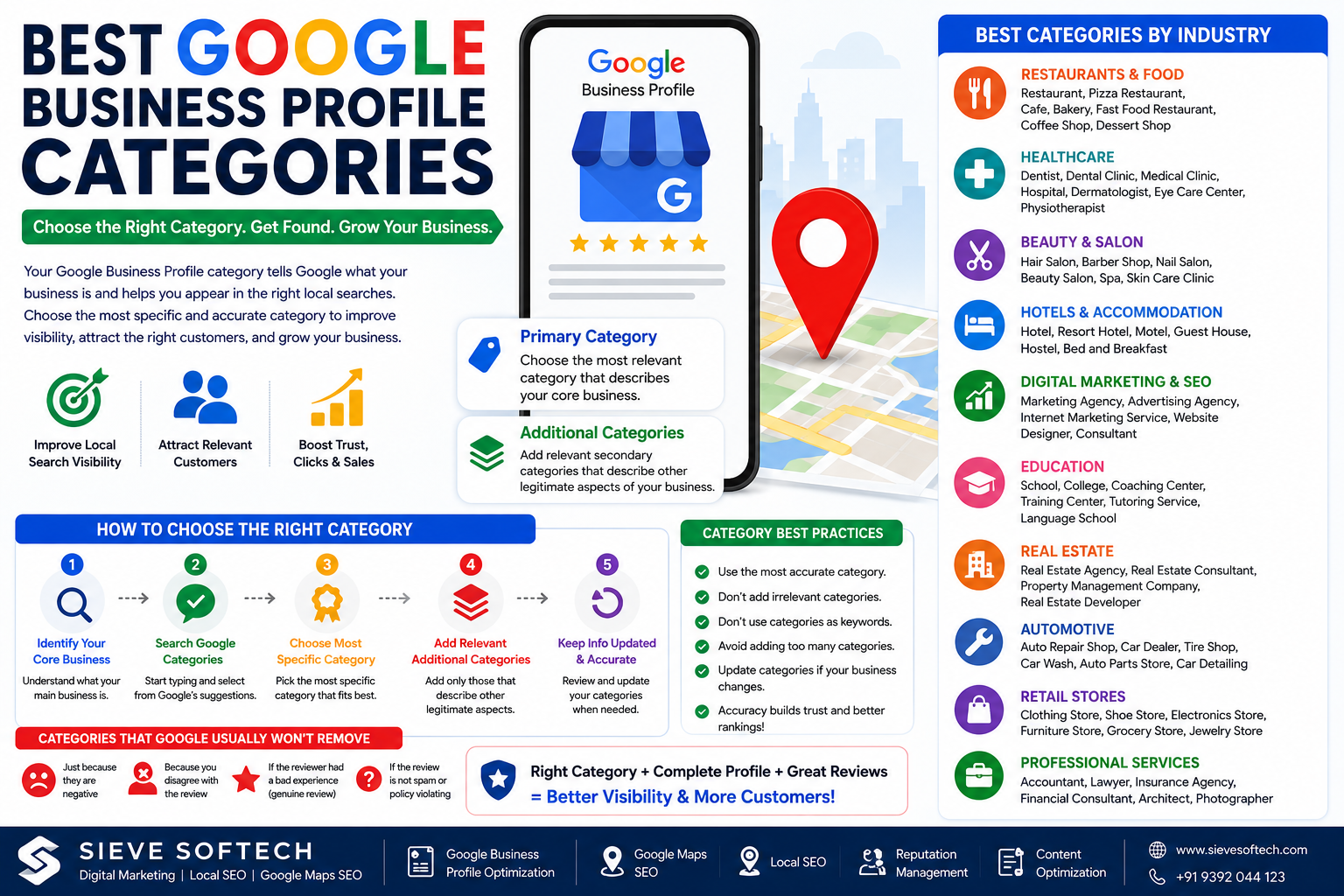
Choosing the right Google Business Profile category is one of the most important steps in local SEO. Your category tells Google what your business is and helps connect your profile with customers searching for relevant products and services.
For example, a business that operates as a pizza restaurant should select a specific restaurant category rather than simply choosing a broad category such as “Restaurant.” Google explains that categories can affect local ranking because they help determine how relevant a Business Profile is to a customer’s search.
However, choosing a category isn’t about adding as many keywords as possible. Google recommends selecting the most specific categories that accurately represent what your business is, rather than categories describing every service, product, or feature the business offers.
In this guide, we’ll explain what Google Business Profile categories are, how primary and additional categories work, examples of useful categories across industries, common mistakes to avoid, and how the right category can support your Local SEO strategy in 2026.
What Is a Google Business Profile Category?
A Google Business Profile category describes the type of business you operate.
Think of it as an answer to this question:
“What kind of business is this?”
For example:
- A dental clinic may use Dentist
- A hotel may use Hotel
- A pizza business may use Pizza restaurant
- A clothing store may use Clothing store
- A digital marketing company may use a relevant marketing or advertising category available in Google’s category selector
Google uses categories to understand your business and connect it with relevant local searches. The category you choose can also influence which features are available on your profile. For example, restaurant profiles may have options related to menus, reservations, or online ordering, while certain health and beauty categories may support booking features.
Why Are Google Business Profile Categories Important?
Your category is more than a label. It helps Google understand the relationship between your business and local search queries.
Suppose a customer searches for:
“dentist near me”
A verified Business Profile categorized appropriately as a dental business has a stronger relevance signal than a profile categorized incorrectly.
Google says local results are primarily influenced by relevance, distance, and prominence. Category selection contributes to the relevance side of this equation by helping Google understand what the business does.
A properly selected category can help you:
- Appear for more relevant local searches
- Help customers understand your business
- Access category-specific profile features
- Improve the relevance of your Business Profile
- Support your broader Local SEO strategy
However, choosing a category alone won’t guarantee a top ranking. Google does not offer a way to pay for or request a better local ranking.
Primary vs. Additional Google Business Profile Categories
Google Business Profiles allow businesses to select a primary category and additional categories.
Primary Category
Your primary category should be the category that best describes your core business.
This is the most important category because it tells Google what your business primarily is.
For example:
Business: Local dental clinic
Primary category: Dentist
Or:
Business: Pizza takeaway business
Primary category: Pizza delivery or another specific supported category that accurately represents the operation.
Google recommends choosing the most specific available category that accurately represents your main business.
Additional Categories
Additional categories can describe other legitimate aspects of your business.
Google currently allows up to nine additional categories in addition to the primary category. However, this doesn’t mean you should use all nine. Google’s guidance recommends using as few categories as necessary to accurately describe the business.
For example, a business may have a primary category representing its core operation and a few additional categories representing genuinely different aspects of that business.
The goal should be accuracy—not maximum category count.
Best Google Business Profile Categories by Industry
Google’s available category list is extensive and can change. The exact category options shown to you depend on the business and Google’s current category database. Therefore, always select the category from Google’s own suggestions rather than manually entering an unsupported category.
Here are examples of category directions for major industries.
1. Restaurants and Food Businesses
Restaurants have many specific category options.
Depending on the business, examples may include:
- Restaurant
- Pizza restaurant
- Indian restaurant
- Chinese restaurant
- Fast food restaurant
- Cafe
- Bakery
- Dessert shop
- Coffee shop
- Vegetarian restaurant
Best Practice
Choose the category that best represents the actual operation.
For example, a pizza-only takeaway business shouldn’t select unrelated categories simply because those keywords have high search volume.
Google specifically recommends using categories that describe what the business is, not simply what it offers.
2. Healthcare Businesses
Healthcare businesses should select categories that accurately describe their professional practice.
Examples can include:
- Dentist
- Dental clinic
- Medical clinic
- Hospital
- Dermatologist
- Pediatrician
- Physiotherapist
- Eye care center
- Medical laboratory
The exact options available will depend on the business and Google’s category list.
Important Tip
Healthcare businesses should avoid selecting categories for services they don’t actually provide.
For example, a general medical clinic shouldn’t select a specialist category unless the business genuinely operates as that type of practice.
3. Beauty and Salon Businesses
Beauty businesses may find categories such as:
- Hair salon
- Barber shop
- Nail salon
- Beauty salon
- Spa
- Skin care clinic
A business should select the category that most accurately represents its core operation.
Google notes that certain health and beauty categories may have access to booking-related features.
4. Hotels and Accommodation
Accommodation businesses may use categories such as:
- Hotel
- Resort hotel
- Motel
- Guest house
- Hostel
- Bed and breakfast
A hotel should choose the most specific category that accurately describes the property.
Category selection can also influence which profile features are available. Google notes that hotel profiles can display information such as class ratings and amenities.
5. Digital Marketing and SEO Agencies
Digital marketing companies should carefully evaluate the categories available in Google’s selector.
Depending on Google’s available options and the actual business model, relevant categories may include:
- Marketing agency
- Advertising agency
- Internet marketing service
- Website designer
- Consultant
Don’t automatically add every marketing-related category.
For example, if your primary business is a digital marketing agency and you also provide website development, select categories that accurately describe the actual business rather than trying to target every possible SEO keyword.
6. Educational Institutions
Education businesses may have categories related to:
- School
- College
- Coaching center
- Educational institution
- Training center
- Tutoring service
- Language school
The correct category depends on what the organization actually is.
A competitive exam coaching center, for example, should choose the most accurate supported category rather than simply selecting “School.”
7. Real Estate Businesses
Real estate companies may encounter categories such as:
- Real estate agency
- Real estate consultant
- Property management company
- Real estate developer
- Commercial real estate agency
Choose the category that best represents the business’s core activity.
A property management company should not select a real estate developer category unless it genuinely operates as a developer.
8. Automotive Businesses
Automotive businesses can include categories related to:
- Auto repair shop
- Car dealer
- Tire shop
- Car wash
- Auto parts store
- Motorcycle dealer
- Car detailing service
Specific categories can help Google better understand what type of automotive business you’re operating.
9. Retail Stores
Retail categories can vary significantly depending on the products sold.
Examples include:
- Clothing store
- Shoe store
- Electronics store
- Furniture store
- Grocery store
- Jewelry store
- Gift shop
- Sporting goods store
A specialty store should generally use the most specific relevant category available.
10. Professional Services
Professional businesses should select categories that describe the actual profession.
Examples may include:
- Accountant
- Lawyer
- Insurance agency
- Financial consultant
- Architect
- Photographer
- Consultant
Avoid choosing unrelated categories simply because they contain popular search terms.
How to Choose the Best Primary Category
Choosing your primary category becomes much easier when you follow a structured process.
Step 1: Identify Your Core Business
Ask:
“What is the main business customers are hiring or visiting us for?”
This should guide your primary category.
Step 2: Search Google’s Category Suggestions
Open your Business Profile and go to the business category section.
Start typing a category and review Google’s suggestions. Select a supported category from the list. Google specifically recommends selecting from the categories provided rather than inventing your own.
Step 3: Choose the Most Specific Accurate Category
If both a broad and specific category are available, the more specific category is generally preferable when it accurately describes your business.
For example, Google itself gives the example that a business should select a specific category such as “Nail salon” rather than the broader “Salon” when appropriate.
Step 4: Compare Your Real Business Model
Don’t choose categories based only on competitors.
Ask:
- What do we actually do?
- What do customers visit us for?
- What is our main service?
- What category best represents the entire business?
Your category should accurately reflect your real-world business.
Common Google Business Profile Category Mistakes
Mistake 1: Adding Too Many Categories
More categories don’t automatically mean better rankings.
Google recommends using as few categories as necessary to accurately describe your overall business.
Mistake 2: Using Categories as Keywords
Categories aren’t a keyword-stuffing opportunity.
Don’t try to manipulate your profile by selecting unrelated categories simply because people search for those terms.
Mistake 3: Choosing a Category for Every Service
Google says categories should describe what your business is, rather than listing every service, product, or amenity it offers.
Your services can be described elsewhere in the Business Profile.
Mistake 4: Copying a Competitor’s Categories
Your competitor’s categories may not be correct for your business.
Instead, evaluate your own business model and choose categories that genuinely represent your operation.
Mistake 5: Changing Categories Frequently
Category changes can sometimes trigger additional verification. Google notes that editing an existing category may require the business to verify again.
Make category changes carefully and only when there is a legitimate reason.
Do Google Business Profile Categories Improve Rankings?
Yes, categories can influence local search relevance, but they are not a guaranteed ranking shortcut.
Google states that categories affect local ranking and that local results are primarily based on relevance, distance, and prominence.
This means a strong Local SEO strategy should combine category optimization with other activities.
These include:
- Complete Business Profile information
- Accurate business hours
- Genuine customer reviews
- Professional review responses
- High-quality photos and videos
- Relevant website content
- Local citations
- Relevant backlinks
- Strong local reputation
Google also recommends keeping Business Profile information complete and accurate because this helps customers understand what the business does, where it is, and when they can visit.
Google Business Profile Categories and Local SEO
Category optimization should be part of a larger Local SEO strategy.
For example, if your primary category tells Google that you are a dental business, your website should also clearly explain your dental services.
Your website, Business Profile, directories, and other online references should provide consistent information about the business.
Google can also detect category-related information from your website and mentions about your business across the web.
This is why businesses should think about Local SEO as an ecosystem rather than treating Google Business Profile as an isolated listing.
How Sieve Softech Can Help With Google Business Profile Optimization
Choosing the right category is only one part of improving your local search presence.
Sieve Softech helps businesses optimize their Google Business Profiles and build stronger Local SEO strategies designed around their industry, location, services, and target customers.
Our services include:
- Google Business Profile Setup
- Primary & Additional Category Optimization
- Google Business Profile Audits
- Google Maps SEO
- Local SEO
- Local Citation Management
- Review & Reputation Management
- Website SEO
- Technical SEO
- Keyword Research
- Content Marketing
- Google Ads
- Social Media Marketing
We focus on accurate, sustainable optimization instead of keyword stuffing or risky tactics.
Whether you operate a local store, healthcare business, educational institution, restaurant, professional service company, or digital agency, the right category strategy can help Google better understand your business and connect it with relevant searches.
Frequently Asked Questions
How many Google Business Profile categories can I add?
Google currently allows one primary category and up to nine additional categories. However, Google recommends using only the categories needed to accurately describe your business.
Can I create my own Google Business Profile category?
No. You should select from the categories Google provides. If your preferred category isn’t available, Google recommends choosing the next best general category.
Should my primary category contain my main keyword?
Not necessarily. Your primary category should describe what your business actually is. It shouldn’t be selected simply because it contains a high-volume keyword.
Can I change my primary category later?
Yes. You can edit your Business Profile category, although Google notes that changing an existing category may trigger another verification request.
Do additional categories improve Google Maps rankings?
Additional categories can help describe legitimate aspects of your business, but adding more categories doesn’t automatically improve rankings. Relevance, distance, and prominence all contribute to local ranking.
Conclusion
Choosing the best Google Business Profile category is a small step that can have a meaningful impact on your Local SEO strategy. Your primary category tells Google what your business is and helps the platform connect your profile with relevant local searches.
The best approach is simple: choose the most specific category that accurately represents your core business, add only relevant additional categories, and avoid using categories as a keyword-stuffing technique.
Remember that category selection is only one part of local search optimization. A complete and accurate Business Profile, genuine reviews, useful website content, strong local authority, relevant citations, and a positive customer experience all work together to build a stronger local presence.
As Google Search and Maps continue to evolve, businesses should focus on accuracy and relevance rather than trying to manipulate rankings. A properly optimized Google Business Profile gives Google clearer information about your business and gives potential customers a better reason to choose you.
If you want to improve your Google Maps visibility and build a stronger local search presence, Sieve Softech can help with Google Business Profile optimization, Local SEO, Google Maps SEO, reputation management, and broader digital marketing strategies.