
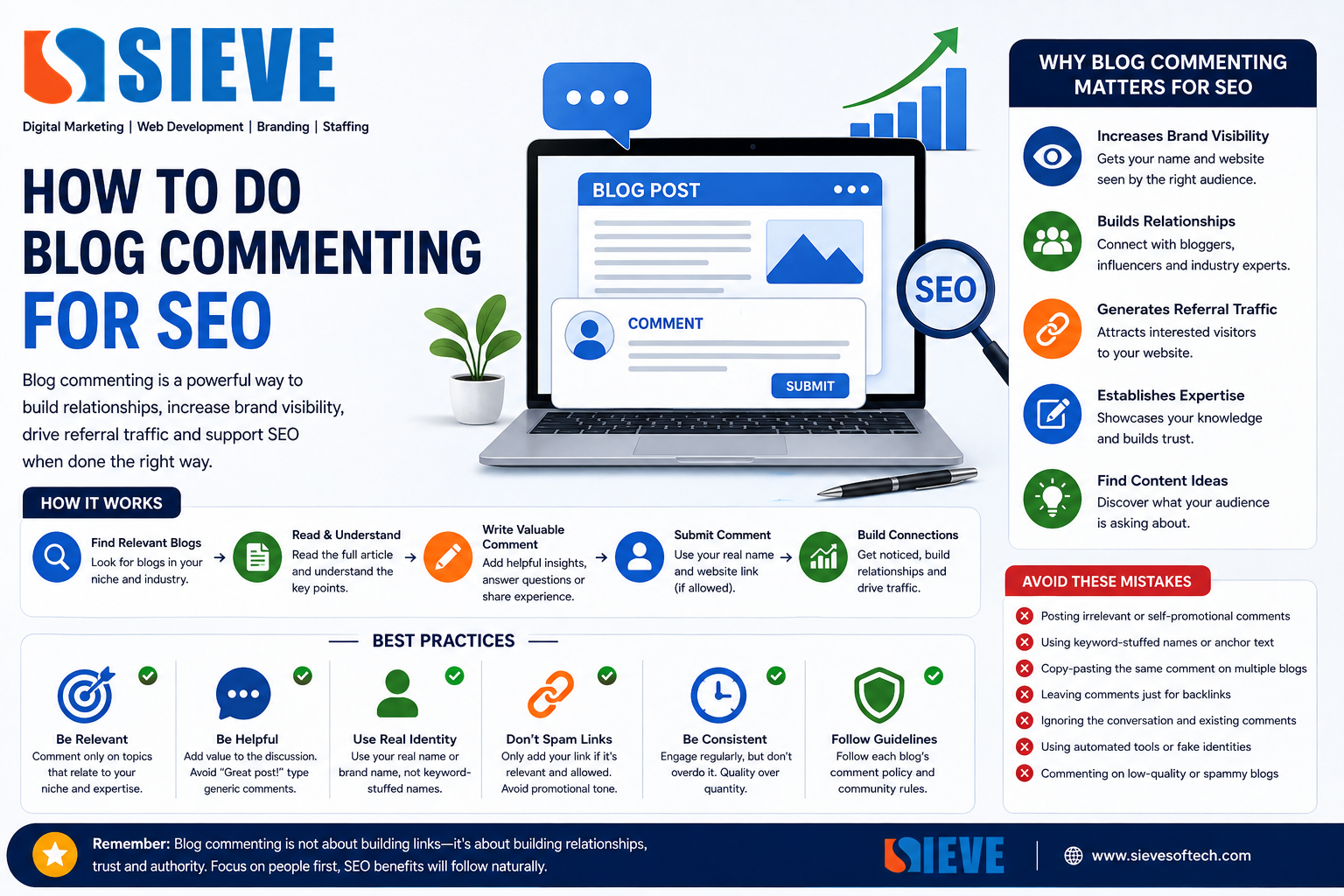
How to Do Blog Commenting for SEO: A Complete Guide for 2026
Introduction
Blog commenting has been used in SEO for many years as a way to participate in online discussions, build relationships, increase brand visibility, and sometimes generate referral traffic.
However, blog commenting is not the same SEO strategy it was years ago.
Simply posting comments such as “Great article, visit my website” on hundreds of blogs and adding a keyword-rich backlink is not a sustainable way to improve rankings. Google specifically identifies spammy blog and forum comments with optimized links as an example of link spam.
That does not mean blog commenting has no value.
When done properly, blog commenting can help you:
- Participate in relevant industry conversations
- Build relationships with bloggers and publishers
- Increase brand awareness
- Generate referral traffic
- Discover new content opportunities
- Establish your expertise
- Build a professional online presence
- Support broader content marketing and outreach
The key is to focus on people and useful conversations rather than manipulating search rankings.
This guide explains how to do blog commenting for SEO safely and effectively in 2026.
What Is Blog Commenting in SEO?
Blog commenting is the process of leaving a relevant, useful comment on a blog post or online article.
A typical comment may include:
- Your name
- Your email address
- Your website, where permitted
- Your comment or contribution
For example, suppose you find an article titled:
“10 Local SEO Strategies for Small Businesses”
Instead of writing:
Great post! Check out my SEO website.
you could contribute something meaningful:
The section about Google Business Profile optimization is especially useful for local businesses. I would also recommend monitoring changes in business hours and service information regularly because inaccurate details can create a poor customer experience.
The second comment contributes something to the discussion.
That distinction is extremely important.
Is Blog Commenting Still Useful for SEO?
Yes, but not primarily as a backlink-building shortcut.
Google recommends marking links in user-generated content, such as comments and forum posts, with rel="ugc". Google also supports nofollow when you don’t want to imply endorsement or pass ranking signals to the linked page.
This means you shouldn’t approach blog commenting with the expectation that every comment link will improve your Google rankings.
Instead, think about the broader benefits.
Blog commenting can help with:
Referral traffic:
Someone may read your comment and visit your website.
Brand visibility:
Your name or company can become familiar within your industry.
Relationships:
Thoughtful comments can start conversations with bloggers, publishers, and industry professionals.
Content discovery:
Comments can help you understand what questions people have.
Networking:
Regular participation can help you become part of a relevant professional community.
So, blog commenting can be useful, but its value is much broader than simply obtaining backlinks.
Blog Commenting vs Comment Spam
Understanding this difference is essential.
Good Blog Commenting
A good comment:
- Is relevant to the article
- Adds useful information
- Answers a question
- Shares a genuine experience
- Provides an additional perspective
- Is written naturally
- Doesn’t aggressively promote a business
Comment Spam
A spam comment often:
- Is unrelated to the article
- Uses keyword-rich anchor text
- Contains promotional links
- Is copied across multiple websites
- Exists primarily to obtain a backlink
- Adds no meaningful information
Google explicitly lists forum comments containing optimized links as an example of link spam.
The difference is simple:
Useful contribution = community participation.
Mass comments created primarily for ranking manipulation = spam risk.
Step 1: Find Relevant Blogs
The first step is finding websites where your audience actually spends time.
Don’t create a list of hundreds of random blogs.
Instead, look for blogs related to your:
- Industry
- Services
- Products
- Target audience
- Geographic market
- Professional interests
For example, if you work in digital marketing, you might look for blogs covering:
- SEO
- Content marketing
- Google Ads
- Local SEO
- Social media
- Web development
- E-commerce
- Branding
- Entrepreneurship
If you are a local business, relevant local publications and community websites may also be useful.
Step 2: Check the Blog Before Commenting
Not every blog is worth participating in.
Before commenting, check whether:
- The content is relevant
- The website appears legitimate
- Articles are regularly updated
- Comments are genuine
- The audience is relevant
- The website isn’t filled with spam
- Your contribution would make sense
Avoid websites that exist mainly to sell backlinks or publish large amounts of low-quality content.
The objective is to participate in genuine communities.
Step 3: Read the Entire Article
Don’t comment after reading only the headline.
Read the article and understand its main argument.
Look for:
- An interesting point
- A question
- Something you disagree with
- A missing perspective
- A practical example
- An opportunity to share relevant experience
This makes your comment more natural.
Step 4: Write Something Valuable
A useful comment doesn’t need to be extremely long.
Even three to five thoughtful sentences can be enough.
For example:
“The section on technical SEO is particularly important for small businesses. I’ve noticed that many businesses focus heavily on keywords but overlook indexing and mobile usability. Checking these areas before investing heavily in content can prevent avoidable problems.”
This comment:
- Relates to the article
- Adds an observation
- Provides value
- Doesn’t aggressively promote a website
That’s much better than:
“Nice blog. Visit my SEO website for the best services.”
Step 5: Avoid Keyword-Stuffed Names
One of the most common mistakes in blog commenting is using a target keyword instead of a real name.
For example:
Bad:
Best SEO Company Hyderabad
Better:
Gopi
or your real personal/professional name, depending on the website’s comment rules.
Using keywords in comment names purely to manipulate links can make the activity look unnatural.
Keep your participation authentic.
Step 6: Don’t Force Your Website Link
Some blogs allow commenters to enter a website URL.
That doesn’t mean you have to use it every time.
Ask yourself:
Does this link genuinely help the reader?
If the answer is no, leave it out.
A link should never be the main reason you are commenting.
If a website allows user-generated links, Google recommends the ugc relationship attribute for such links.
Step 7: Answer Questions in the Comments
One of the best ways to use blog comments is by answering questions.
Suppose an article discusses:
“How to Improve Google Business Profile Rankings”
and someone asks:
“Should a local business create multiple profiles for different services?”
You can provide a helpful response based on Google’s guidelines and your experience.
This is much more valuable than simply dropping your website URL.
It can also establish you as someone who understands the subject.
Step 8: Build Relationships With Bloggers
Blog commenting can become a networking strategy.
If you regularly contribute thoughtful comments to the same industry blog, the author may eventually recognize your name.
Over time, this can lead to:
- Conversations
- Interviews
- Collaborations
- Guest contribution opportunities
- Podcast invitations
- Industry connections
- Content partnerships
This is one of the strongest long-term benefits of genuine blog participation.
Step 9: Use Blog Comments for Content Research
Comments can provide valuable information about what your target audience wants to know.
For example, an article about SEO might have comments asking:
- How long does SEO take?
- Are backlinks still important?
- How do I optimize Google Business Profile?
- What’s the difference between SEO and Google Ads?
- How much does Local SEO cost?
These questions can become future content ideas.
You could create:
“How Long Does SEO Take? A Practical Guide for Businesses”
or:
“Are Backlinks Still Important for SEO in 2026?”
This turns blog commenting into a content research activity.
Step 10: Track Referral Traffic
If your objective includes traffic, use analytics to see whether your efforts generate visitors.
You can monitor:
- Referral traffic
- Sessions
- Engaged visits
- Landing pages
- Conversions
- Leads
Don’t judge the success of blog commenting only by the number of links obtained.
For example:
10 genuine visitors who become two leads
may be much more valuable than:
100 irrelevant backlinks that generate zero customers.
How to Write a Good SEO Blog Comment
A simple structure can make commenting easier.
Formula 1: Appreciation + Insight
“The explanation of keyword intent was especially useful. I agree that understanding why someone searches is often more important than simply targeting high-volume keywords.”
Formula 2: Agreement + Example
“The point about internal linking is important. On larger websites, creating topic clusters can make it easier for users to discover related resources.”
Formula 3: Question + Contribution
“The section about Local SEO raises an interesting point. Do you recommend reviewing Google Business Profile information monthly, especially for businesses with frequently changing hours?”
Formula 4: Additional Information
“Another factor worth considering is mobile usability. A page may have strong content, but if the experience is difficult on mobile devices, users may leave quickly.”
These approaches create actual conversations.
Should You Use Exact-Match Keywords in Blog Comments?
Generally, no.
Avoid repeatedly using phrases such as:
- Best SEO Company
- Cheap SEO Services
- SEO Services Hyderabad
- Best Digital Marketing Agency
- Affordable SEO Agency
especially when they are used as names or anchor text solely to obtain links.
Natural participation is safer and more professional.
Use your actual name or brand name when appropriate.
How Many Blog Comments Should You Make?
There is no ideal number.
Don’t create a target such as:
“I need 100 blog comments every month.”
That encourages quantity over quality.
Instead, focus on relevance.
You might participate in:
- 2 highly relevant discussions per week
- 5 meaningful discussions per month
- 10 industry conversations when appropriate
The exact number doesn’t matter.
The quality of your participation matters more than the count.
Blog Commenting and Backlinks
This is where many outdated SEO strategies go wrong.
Some people still promote blog commenting as a way to build hundreds of backlinks.
That’s not a good approach.
Google’s current spam documentation defines link spam as creating links primarily to manipulate rankings. It specifically includes forum comments with optimized links and low-quality directory or bookmark links among examples.
Google also recommends rel="ugc" for links in comments and forum posts.
Therefore, don’t build your SEO strategy around collecting comment links.
Instead:
Use comments to build visibility, relationships, knowledge, and referral opportunities.
Do Blog Comment Links Improve Rankings?
You shouldn’t assume that a blog comment link will directly improve your rankings.
Many comment links are qualified as ugc or nofollow, and Google treats these attributes as hints rather than simple guarantees about how a link will be used.
Even when a link doesn’t provide a direct ranking benefit, it may still have value if it generates:
- Relevant referral traffic
- Brand exposure
- New relationships
- Content discovery
- Business opportunities
That’s why SEO should be measured beyond backlink counts.
Blog Commenting for Local SEO
Local businesses can also participate in relevant local discussions.
For example, a Hyderabad-based business might engage with:
- Local business blogs
- Hyderabad startup publications
- Industry communities
- Local events
- Professional organizations
- Relevant community websites
The goal isn’t to insert a location keyword into every comment.
Instead, participate naturally in discussions relevant to your local market.
This can help build brand awareness and relationships with local publishers and businesses.
Blog Commenting for Digital Marketing Agencies
Digital marketing agencies can use blog commenting as part of a broader marketing strategy.
For example, an agency can participate in discussions about:
- SEO
- Google Business Profile
- Google Ads
- Content marketing
- Web development
- Social media
- Local SEO
- Analytics
A thoughtful comment can demonstrate expertise without turning every discussion into an advertisement.
For an agency such as Sieve Softech, the objective should be to build industry visibility and demonstrate knowledge rather than simply collect comment backlinks.
Common Blog Commenting Mistakes
1. Copy-Pasting the Same Comment
Avoid using:
“Great article. Thanks for sharing!”
on 100 websites.
It provides little value.
2. Keyword-Stuffed Names
Don’t use your target keyword as your identity just to obtain an anchor-text link.
3. Excessive Promotion
Comments aren’t advertisements.
4. Irrelevant Websites
Don’t comment on unrelated blogs just because they allow links.
5. Automated Commenting
Avoid tools that automatically post comments across websites.
6. Commenting Only for Backlinks
If you wouldn’t participate without the link, your strategy probably needs to change.
7. Ignoring the Discussion
Read the article and existing comments before responding.
8. Writing Generic Comments
Add something specific to the article.
A Simple Blog Commenting Workflow
Here’s a practical workflow you can follow.
Step 1
Identify 20–30 relevant websites in your industry.
Step 2
Evaluate their content and audience.
Step 3
Subscribe to new content where possible.
Step 4
Read articles relevant to your expertise.
Step 5
Identify something genuinely worth discussing.
Step 6
Write a short, useful comment.
Step 7
Avoid unnecessary promotional links.
Step 8
Respond if the author or another commenter replies.
Step 9
Track referral traffic and meaningful interactions.
Step 10
Build relationships with the most relevant publishers.
This approach is much more sustainable than mass comment submission.
Blog Commenting vs Other Link-Building Strategies
| Strategy | Main Purpose |
|---|---|
| Blog commenting | Discussion and networking |
| Digital PR | Brand exposure and earned links |
| Guest contributions | Expertise and audience reach |
| Resource link building | Earn relevant editorial links |
| Content marketing | Attract organic attention |
| Business citations | Local visibility |
| Partnerships | Relationships and relevant mentions |
Blog commenting should be considered one small part of a broader SEO strategy, not the entire backlink strategy.
Best Practices for Blog Commenting in 2026
Keep these principles in mind:
Be Relevant
Comment only when the topic relates to your expertise.
Be Helpful
Add information rather than repeating the article.
Be Human
Write naturally.
Be Consistent
Participate regularly rather than posting hundreds of comments at once.
Be Respectful
Disagree professionally when necessary.
Avoid Manipulation
Don’t use comments primarily to manipulate rankings.
Think Beyond Links
Focus on traffic, relationships, reputation, and visibility.
Google’s spam policies emphasize that links created primarily to manipulate search rankings can be considered link spam.
Frequently Asked Questions
Is blog commenting good for SEO?
Blog commenting can support SEO indirectly through referral traffic, brand awareness, networking, and content research. It should not be treated as a method for generating large numbers of ranking-manipulation backlinks.
Are blog comment backlinks still useful?
Their direct SEO value can be limited, particularly when links are marked ugc or nofollow. Their potential for referral, networking, and brand awareness can still be useful.
Should I use keywords in blog comments?
Avoid keyword stuffing or using target keywords as your name solely for SEO. Use your real name or appropriate brand identity and write naturally.
How many blog comments should I create?
There is no ideal number. Prioritize relevant and meaningful discussions instead of chasing a specific backlink count.
Can blog commenting hurt SEO?
Spammy comment links created to manipulate rankings can create problems. Google identifies comment spam and optimized links in comments as examples of link spam.
Should I add my website link to every comment?
No. Only include a link when the website permits it and when the link genuinely adds value to the discussion.
What is rel="ugc"?
rel="ugc" is a link attribute Google recommends for links within user-generated content, including comments and forum posts.
Is blog commenting better than guest posting?
They serve different purposes. Blog commenting is useful for discussion and networking, while legitimate guest contributions can provide broader audience exposure. Neither should be used primarily to manipulate rankings.
Conclusion
Blog commenting for SEO is no longer about leaving hundreds of backlinks across random websites.
A modern approach is focused on relevance, usefulness, relationships, and genuine participation.
Find blogs that are relevant to your industry. Read the content carefully. Contribute something meaningful. Answer questions. Share useful experiences. Avoid keyword stuffing and unnecessary promotional links.
Most importantly, don’t measure success only by the number of backlinks you create.
A thoughtful comment can lead to a valuable conversation, a referral visitor, a business relationship, a content idea, or even a future collaboration.
Google’s current guidance makes the distinction clear: user-generated links, such as comments, should be appropriately qualified, and creating links primarily to manipulate search rankings may constitute link spam.
So, if you’re using blog commenting in your 2026 SEO strategy, follow one simple rule:
Don’t comment to build links. Comment to build value.
The links, relationships, visibility, and opportunities that naturally follow can become much more valuable than a list of low-quality backlinks.