
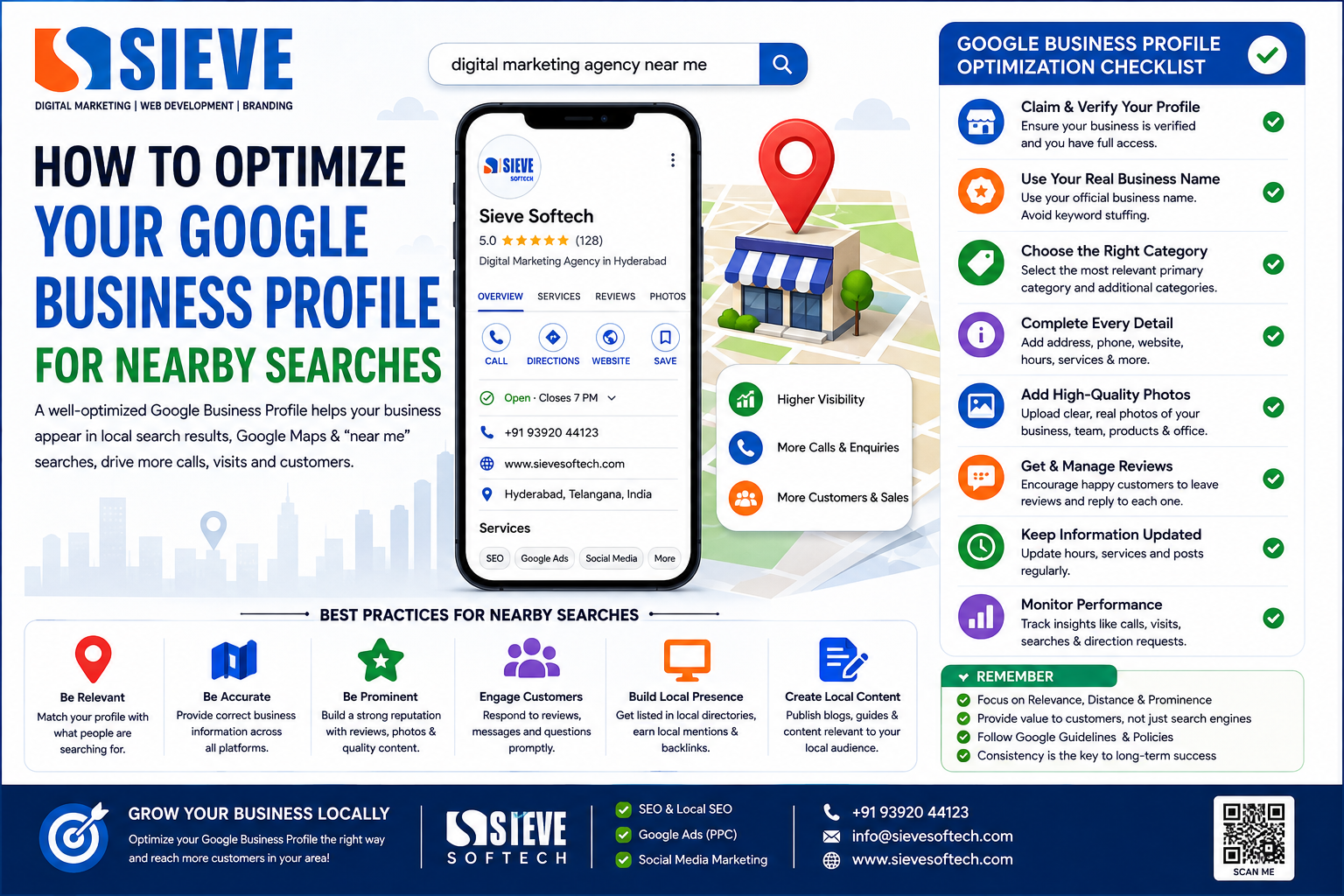
How to Optimize Your Google Business Profile for Nearby Searches
Introduction
When people search for a business near them, Google often displays local businesses through Google Search and Google Maps. Searches such as “SEO agency near me,” “best restaurant near me,” “dentist near me,” or “digital marketing agency in Hyderabad” are examples of local searches where a well-optimized Google Business Profile can help a business become more visible.
A Google Business Profile acts like a digital storefront on Google. It can show important information such as your business name, location, phone number, website, hours, photos, services, and customer reviews.
But simply creating a profile doesn’t guarantee that your business will appear at the top of nearby searches.
Google explains that local results are primarily influenced by relevance, distance, and prominence.
That means your optimization strategy should focus on accurately explaining what your business does, maintaining reliable information, building a strong reputation, and making it easy for nearby customers to choose your business.
In this guide, you’ll learn how to optimize your Google Business Profile for nearby searches and improve your local SEO foundation.
What Is a Google Business Profile?
A Google Business Profile (GBP) is a free business listing that allows eligible businesses to manage how they appear on Google Search and Google Maps.
Depending on the business, the profile can display:
- Business name
- Primary category
- Address
- Service area
- Phone number
- Website
- Business hours
- Photos and videos
- Services
- Products
- Customer reviews
- Business description
- Other relevant business information
Google describes the Business Profile as a local storefront on Search and Maps for businesses that have a physical location or serve customers locally.
For a local business, this makes GBP an important part of a broader Local SEO strategy.
Why Nearby Searches Matter
People searching nearby often have strong purchase intent.
Consider these searches:
- “hair salon near me”
- “SEO company near me”
- “best coaching center near me”
- “restaurant near me”
- “dentist near me”
- “digital marketing agency Hyderabad”
The person isn’t necessarily looking for general information. They may be looking for a business they can contact, visit, or hire.
This is why appearing in local search can generate valuable:
- Phone calls
- Website visits
- Direction requests
- Store visits
- Appointment bookings
- Enquiries
- Sales
A strong Google Business Profile helps potential customers understand your business before they decide what to do next.
Understand How Google Local Rankings Work
Before optimizing your profile, it is important to understand Google’s main local ranking factors.
Google says local results are primarily based on:
1. Relevance
Relevance refers to how well your Business Profile matches what someone is searching for.
For example, if your profile clearly identifies your business as a digital marketing agency and accurately describes the services you provide, Google has more information to determine whether your business is relevant to searches related to those services.
2. Distance
Distance refers to how far your business is from the person searching or from the location included in the search.
This is particularly important for searches containing phrases such as:
“near me”
or
“near Kukatpally.”
You cannot completely control this factor because the searcher’s location changes.
3. Prominence
Prominence relates to how well-known a business is.
Google says prominence can be influenced by information such as links from other websites and reviews. More reviews and positive ratings can help local ranking.
This is why Local SEO is more than just editing your Google Business Profile.
1. Claim and Verify Your Google Business Profile
The first step is to make sure you own and manage the correct Business Profile.
Verification helps Google confirm that you are authorized to represent the business.
A verified profile gives you greater control over your business information and allows you to manage important profile elements.
Before doing anything else, check:
- Is the profile verified?
- Is the correct business listed?
- Do you have owner or manager access?
- Is there another duplicate profile?
- Is the information accurate?
Google recommends accurate representation of a business and says businesses should generally have one profile per business.
2. Use Your Real Business Name
Your business name should match the name your business actually uses in the real world.
For example, if your business is called:
Sieve Softech
don’t change the profile name to:
Sieve Softech – Best Digital Marketing Agency in Hyderabad – SEO Company
just to insert keywords.
Google’s guidelines say the business name should reflect the real-world name used consistently on your storefront, website, stationery, and by customers. Unnecessary information in the business name can violate Google’s guidelines and potentially create suspension problems.
Best practice:
Use your actual business name.
Put relevant business information in the appropriate fields instead.
3. Choose the Most Accurate Primary Category
Your primary category helps Google understand what your business is.
For example, a business might be categorized as:
- Digital marketing agency
- Restaurant
- Dental clinic
- Hair salon
- Hotel
- Educational institution
- Real estate agency
Choose the category that best represents your core business.
Google recommends choosing the fewest categories needed to describe the overall core business rather than adding unnecessary categories.
Don’t select categories simply because you think they have high search volume.
Relevance is more important than trying to manipulate category selection.
4. Add Relevant Secondary Categories
Where appropriate, you can add additional categories that accurately describe your business.
For example, a business may provide multiple related services.
However, don’t add unrelated categories just to try to appear for more searches.
Your categories should accurately represent what customers can actually find or receive from your business.
Review your categories periodically as your services evolve.
5. Complete Every Important Business Detail
One of the easiest improvements you can make is ensuring your profile information is complete and accurate.
Check:
- Business name
- Address
- Phone number
- Website
- Business hours
- Holiday hours
- Categories
- Services
- Business description
- Service area, where applicable
Google says businesses with complete and accurate information are more likely to appear in relevant local searches.
Incomplete information can make it harder for customers to understand whether your business is suitable for them.
6. Keep Your Address Accurate
If customers visit your business location, make sure your address is accurate.
Your business information should be consistent across your:
- Google Business Profile
- Website
- Major directories
- Social profiles
- Other relevant online platforms
Google’s guidelines emphasize that businesses should represent their location accurately and use a precise address or service area where applicable.
Don’t create fake locations simply to rank in different neighborhoods.
That can create serious problems for your profile.
7. Set Your Service Area Correctly
Service-area businesses that travel to customers should accurately define their service areas.
For example, a business may serve customers across:
- Hyderabad
- Secunderabad
- Kukatpally
- Madhapur
- Gachibowli
Only include areas you genuinely serve.
Don’t add dozens of cities simply because you want to rank there.
Your profile should reflect your real operations.
8. Write a Useful Business Description
Your business description is an opportunity to explain:
- What your business does
- Which services you provide
- Who you serve
- What makes your business different
- Your experience or mission
For example:
Sieve Softech provides digital marketing, SEO, Google Ads, social media marketing, web development, branding, and lead generation solutions for businesses looking to grow their online presence.
The description should sound natural and be useful to customers.
Google says the business description should provide useful information about products and services, as well as the business’s mission and history. It should not contain links or focus on promotional offers and prices.
9. Add Your Services
Services can help customers understand exactly what your business offers.
For a digital marketing agency, services might include:
- SEO
- Local SEO
- Google Ads
- Social Media Marketing
- Content Marketing
- Google Business Profile Optimization
- Website Development
- Lead Generation
For a restaurant, services could be different.
For a clinic, you might list relevant treatments or specialties where supported.
The important point is:
Only list services you genuinely provide.
10. Add High-Quality Photos
Photos make a Business Profile more useful and attractive.
Depending on your business, consider adding:
- Exterior photos
- Interior photos
- Team photos
- Product photos
- Service photos
- Equipment
- Completed work
- Branding
- Office or storefront images
Google recommends clear, well-lit photos that accurately represent the business. Its current guidance recommends 720 × 720 pixels and a minimum of 250 × 250 pixels for photos, with JPG or PNG formats.
For exterior photos, Google recommends adding at least three good photos so customers can recognize the business when approaching it.
Avoid excessive filters or heavily altered images.
The objective is to show customers what your business actually looks like.
11. Keep Photos Relevant
Don’t upload random stock images simply because they look attractive.
If you’re a restaurant, show:
- Dining area
- Food
- Entrance
- Staff
- Facilities
If you’re a digital marketing agency, show:
- Office
- Team
- Workspace
- Meetings
- Events
- Branding
- Genuine client/project visuals where permitted
Authentic images can help customers feel more confident about the business.
12. Get Genuine Customer Reviews
Reviews are one of the most important parts of local business reputation.
Encourage genuine customers to share their experiences.
You can make this easier by providing your Google review link or QR code after a genuine customer interaction. Google specifically allows businesses to ask customers for reviews through a Google link or QR code.
However, don’t:
- Buy reviews
- Create fake reviews
- Offer discounts in exchange for reviews
- Ask customers to change honest reviews
- Ask only for positive reviews while discouraging negative feedback
Google says offering incentives in exchange for reviews or changes to reviews is prohibited.
The goal should be more genuine customer feedback, not artificially high ratings.
13. Respond to Your Reviews
Don’t simply collect reviews and ignore them.
Respond professionally to:
- Positive reviews
- Neutral reviews
- Negative reviews
A simple response to a positive review might be:
Thank you for sharing your experience. We’re glad you were happy with our service and appreciate your support.
For negative feedback, stay professional and avoid arguments.
A thoughtful response shows potential customers that you pay attention to customer experiences.
Google also recommends replying to reviews as part of managing your Business Profile.
14. Keep Your Business Hours Updated
Incorrect hours can create a frustrating customer experience.
Imagine someone searches:
“restaurant near me open now”
and Google shows your business as open when you’ve actually closed.
The customer may arrive and find the business closed.
Regularly check:
- Normal opening hours
- Holiday hours
- Special closures
- Temporary changes
Google specifically recommends keeping business information up to date for better local visibility.
15. Use Google Business Profile Posts Carefully
Where available and appropriate, businesses can publish updates through their Business Profile.
Content might include:
- Business updates
- Events
- Announcements
- Useful information
- New services
- Relevant customer updates
Don’t use posts as a place to stuff keywords.
Keep them useful and relevant.
Google’s Business Profile content policies apply to posts, photos, and videos, so businesses should make sure their content follows the platform’s requirements.
16. Build a Strong Local SEO Website
Your Google Business Profile should not exist separately from your website.
Your website should clearly explain:
- What you do
- Where you operate
- Who you serve
- Your services
- How customers can contact you
For example, a Hyderabad digital marketing agency could have pages targeting genuinely relevant services and locations, such as:
Digital Marketing Services in Hyderabad
SEO Services in Hyderabad
Local SEO Services
These pages should provide useful information rather than simply repeating city names.
Your website can also support your overall local search presence because Google uses publicly available web information when sourcing information for local search.
17. Keep Your Business Information Consistent
Check whether your business information is consistent across important online sources.
Look for:
- Business name
- Address
- Phone number
- Website
- Business category
- Service information
Inconsistent information can create confusion for customers and search engines.
For example:
Google: Sieve Softech
Website: Sieve Softech
Directory: Sieve Softech
is preferable to having several unrelated versions of the business name.
18. Earn Relevant Local Mentions
Prominence can be strengthened through broader online recognition.
Consider opportunities such as:
- Local business publications
- Industry websites
- Professional organizations
- Local news
- Community websites
- Relevant directories
- Partnerships
- Sponsorships
- Digital PR
Don’t buy hundreds of low-quality links.
Focus on genuine mentions from relevant sources.
Google says prominence can be influenced by information across the web, including links and reviews.
19. Create Locally Relevant Content
Create content that genuinely helps people in your service area.
For example, a Hyderabad digital marketing company could publish:
- Local SEO Guide for Hyderabad Businesses
- Google Maps Marketing Guide
- Digital Marketing Trends in Hyderabad
- SEO Tips for Hyderabad Startups
- How Local Businesses Can Generate Leads Online
A healthcare business could create content answering common questions from local patients.
The important thing is not to create dozens of pages that simply replace one city name with another.
Local content should have real local value.
20. Don’t Create Fake Business Profiles
Creating multiple fake profiles to target different neighborhoods is not a good Local SEO strategy.
Google’s guidelines state that there should generally be only one profile per business.
If your business genuinely has multiple locations, each eligible location can be represented appropriately.
But don’t create fake offices just to manipulate nearby searches.
21. Optimize for “Near Me” Searches Naturally
You don’t need to add “near me” dozens of times to your profile.
Google understands geographic context.
Instead, focus on:
- Accurate location
- Correct category
- Complete services
- Useful website content
- Genuine reviews
- Strong local reputation
- Accurate business information
For example, if your business is a dental clinic in Hyderabad, customers searching for “dentist near me” may be shown relevant businesses based partly on their location and the relevance of the available profiles.
You cannot force Google to show your business for every nearby search.
22. Understand the Limits of Distance
One of the biggest misunderstandings about Google Maps SEO is that you can optimize your profile enough to rank everywhere.
You can’t completely control distance.
If two people search for the same service from different parts of Hyderabad, they may see different local results.
Google considers the searcher’s location when determining local results.
Therefore, your goal should be to build strong visibility within the areas you genuinely serve rather than trying to manipulate your location.
23. Monitor Your Google Business Profile Performance
Regular monitoring helps you understand what is happening.
Review available performance information such as:
- Searches
- Views
- Website visits
- Calls
- Direction requests
- Customer interactions
Look for patterns.
For example:
If many customers discover you through a particular service, consider creating more useful content around that service.
If calls are increasing but website conversions are low, review your website and enquiry process.
24. Common Google Business Profile Mistakes
Avoid these common mistakes:
Keyword-Stuffed Business Name
Don’t add unnecessary keywords to your official business name.
Fake Locations
Don’t create locations where your business doesn’t actually operate.
Fake Reviews
Don’t buy or manufacture reviews.
Duplicate Profiles
Avoid unnecessary duplicate listings.
Wrong Categories
Choose accurate categories.
Outdated Hours
Keep opening times current.
Poor Photos
Use clear, genuine business images.
Incomplete Services
Explain what you actually offer.
Ignoring Negative Reviews
Respond professionally instead of arguing.
Keyword Stuffing
Don’t repeat city names and keywords unnaturally.
Google Business Profile Optimization Checklist
Use this checklist to review your profile:
- Business profile claimed
- Profile verified
- Real business name used
- Correct primary category selected
- Relevant additional categories selected
- Address accurate
- Service area accurate
- Phone number correct
- Website linked
- Business hours updated
- Holiday hours checked
- Business description completed
- Services added
- Products added where relevant
- High-quality photos uploaded
- Genuine customer reviews encouraged
- Reviews answered professionally
- Website optimized for Local SEO
- Business information consistent online
- Local mentions developed
- Performance monitored
Frequently Asked Questions
How do I rank higher in Google “near me” searches?
Focus on an accurate and complete Google Business Profile, relevant categories and services, genuine reviews, strong website content, local authority, and accurate business information. Google says local rankings are primarily based on relevance, distance, and prominence.
Can I rank in every nearby area?
No. Distance is an important local ranking factor, and search results can vary depending on where the person is searching from.
Does adding keywords to my business name improve rankings?
You should not add keywords that aren’t part of your real-world business name. Google requires businesses to accurately represent their real-world name and warns that unnecessary information in the business name can violate guidelines.
How often should I update my Google Business Profile?
Review your profile regularly and update information whenever something changes. Pay particular attention to hours, services, photos, contact information, and other customer-facing details.
Do Google reviews help local SEO?
Google says review count and positive ratings can help local ranking, while reviews also help potential customers evaluate a business. Reviews must represent genuine customer experiences.
Should I buy Google reviews?
No. Google prohibits incentives for reviews and other practices that create fake or misleading review content.
Do photos help a Google Business Profile?
Photos make the profile more useful and can help customers understand and recognize the business. Google recommends clear, well-lit photos that accurately represent the business.
Conclusion
Optimizing your Google Business Profile for nearby searches isn’t about finding one secret ranking trick.
It’s about building a complete and trustworthy local presence.
Start with the basics: claim and verify your profile, use your real business name, choose accurate categories, provide complete information, maintain correct hours, add relevant services, and upload genuine photos.
Then strengthen the wider Local SEO ecosystem through genuine customer reviews, professional review responses, a useful local website, consistent business information, relevant local mentions, and helpful content.
Most importantly, remember Google’s three primary local ranking concepts:
Relevance + Distance + Prominence.
You can improve relevance and prominence through the quality of your business information, website, reputation, and online presence. Distance, however, depends heavily on where the customer is searching from.
So don’t try to create fake locations or manipulate your profile.
Instead, build a Google Business Profile that accurately represents your business and genuinely helps nearby customers find, understand, and choose you.
That is the foundation of a sustainable Google Maps and Local SEO strategy in 2026.